 Firefox
About MAIN FEATURE JNL Font
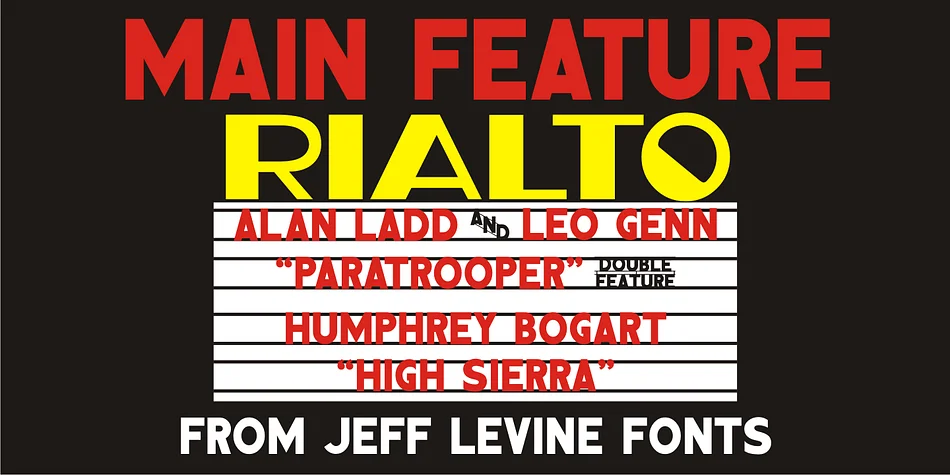
The chunky plastic letterforms in Main Feature JNL, designed by Jeff Levine Fonts, capture the nostalgic appeal of vintage theater marquees. Each character has that blocky, dimensional quality of those illuminated signs you'd see outside a cinema, giving any project an instant retro charm that feels both approachable and theatrical.
What sets this font apart is the thoughtful character substitution built for marquee projects. The pipe character (|) spells out "double feature," the caret (^) becomes "and," and the tilde (~) becomes "with." These additions make it possible to build authentic marquee copy without workarounds. It's the right fit for anyone creating theater-themed designs.
This typeface excels for vintage cinema promotions, retro movie poster designs, event marquee signage for indie theaters, and nostalgic entertainment branding. You might use it for a drive-in theater night invitation, craft a 1950s-inspired announcement with that classic showtime aesthetic, or build authentic marquee mock-ups that actually feel period-appropriate. Main Feature JNL delivers the display weight needed for headline work that commands attention with theatrical flair. Get it on Creative Fabrica and start building those marquee moments.
Style & Use Cases
- Overall Style
- Eye-catching, Bold
- Use Case
- Headlines, Logos
- Ideal For
- posters, branding, and social media graphics
- Pairs With
- a readable sans or serif for body
How to Install MAIN FEATURE JNL Font
Step-by-step instructions for every platform
- 1Download the MAIN FEATURE JNL font file (.ttf or .otf).
- 2Locate the downloaded file in your Downloads folder.
- 3Right-click the font file.
- 4Select "Install" to install for the current user, or "Install for all users" to make it available system-wide.
- 5MAIN FEATURE JNL is now available in Word, Photoshop, Illustrator, and all other apps.
More by Jeff Levine Fonts
View all →



Browse fonts by theme
Curated collections →Saw a font in a picture? Identify any font from an image with our free Font Finder.
More Display Fonts
Browse all →







What pairs well with MAIN FEATURE JNL Font?
MAIN FEATURE JNL Font is a display font that shines as a display or heading face. Pair it with a clean sans-serif or serif font for body text — the contrast creates a clear hierarchy while the two styles stay balanced and easy to read.




MAIN FEATURE JNL Font
Reviewed by the FontBoxDL team · Updated September 2026