 Firefox
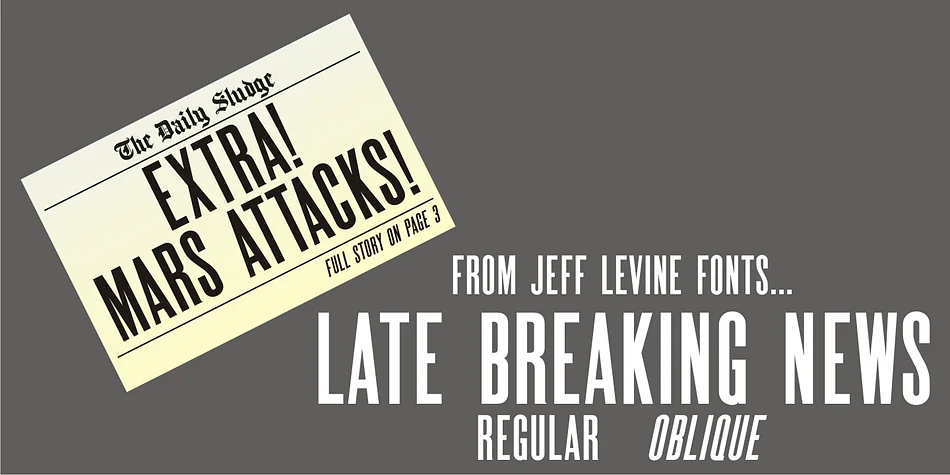
About LATE BREAKING NEWS JNL Font
This typeface carries the unmistakable gravitas of classic journalism with real visual authority. Late Breaking News JNL, created by Jeff Levine Fonts, is a traditional sans serif drawn directly from a vintage newspaper front page. Every character retains authentic historical detail, making it genuinely suited for design work that needs to feel both authoritative and approachable without stuffy pretense.
Use it for magazine mastheads that demand immediate visual credibility, retro branding for vintage-inspired local businesses, bold event posters with nostalgic period charm, or editorial spreads that genuinely benefit from that newsprint character and heritage feel. It also performs beautifully for podcast album artwork needing authentic period details, vintage-style restaurant menus where typography carries narrative weight, and promotional materials for antique shops or heritage brands looking to signal authenticity. The regular weight and comprehensive character set handle all headline applications without excessive ornamentation or visual quirks that might unnecessarily dilute its impact.
Pair Late Breaking News JNL with a warm, readable sans serif body font to let the display face command attention where it belongs and deserves to shine. Pick it up on Creative Fabrica to bring genuine newsroom authenticity to your next design project.
Style & Use Cases
- Overall Style
- Eye-catching, Bold
- Use Case
- Headlines, Logos
- Ideal For
- posters, branding, and social media graphics
- Pairs With
- a readable sans or serif for body
How to Install LATE BREAKING NEWS JNL Font
Step-by-step instructions for every platform
- 1Download the LATE BREAKING NEWS JNL font file (.ttf or .otf).
- 2Locate the downloaded file in your Downloads folder.
- 3Right-click the font file.
- 4Select "Install" to install for the current user, or "Install for all users" to make it available system-wide.
- 5LATE BREAKING NEWS JNL is now available in Word, Photoshop, Illustrator, and all other apps.
More by Jeff Levine Fonts
View all →



Browse fonts by theme
Curated collections →Saw a font in a picture? Identify any font from an image with our free Font Finder.
More Display Fonts
Browse all →







What pairs well with LATE BREAKING NEWS JNL Font?
LATE BREAKING NEWS JNL Font is a display font that shines as a display or heading face. Pair it with a clean sans-serif or serif font for body text — the contrast creates a clear hierarchy while the two styles stay balanced and easy to read.




LATE BREAKING NEWS JNL Font
Reviewed by the FontBoxDL team · Updated October 2026