 Firefox
 1 / 4
1 / 4About Kremlin II Pro Font
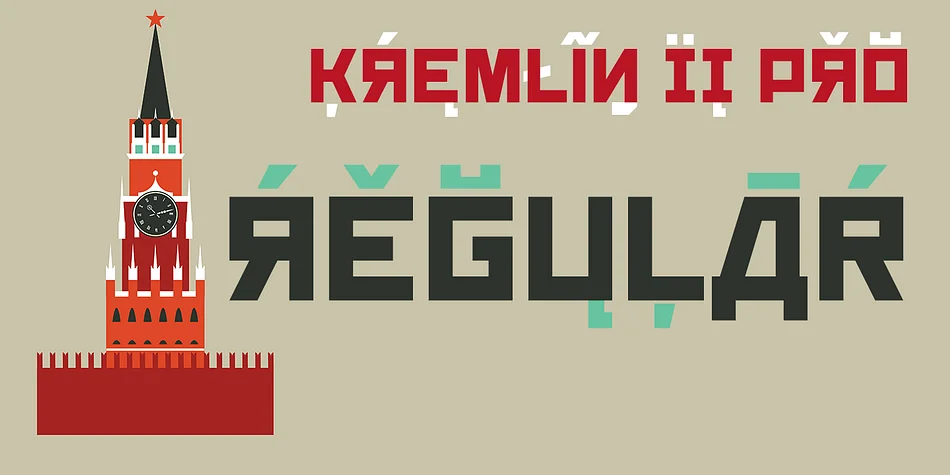
You're laying out a vintage Soviet poster design and need that unmistakable constructivist punch. Kremlin II Pro, from CheapProFonts, is built exactly for that moment. The typeface plays with a central gimmick: most of its uppercase letters are designed to mimic Cyrillic forms, so mixing Latin and these Cyrillic-styled characters creates an authentic-looking (if wonderfully fake) Russian text effect.
What makes this genuinely useful is the full, proper Cyrillic character set included alongside the Latin alphabet. You get authentic support for Russian, Ukrainian, Serbian, and other Cyrillic-based languages, not just the novelty factor. This opens real possibilities for Cold War themed event posters, Soviet-style music venue designs, Eastern European restaurant menus, and retro propaganda graphics without breaking the design language.
The constructivist boldness reads unmistakably strong at headline sizes, and the font supports over 65 Latin-based languages plus complete Cyrillic script. If you want alternative glyphs for specific characters (like K, k, M, m, N, n, R, r, V, v, X, x and the punctuation marks), Kremlin Pro offers different designs for comparison. Kremlin II Pro is on Creative Fabrica, ready whenever your next Soviet-inspired project calls for that constructivist edge.
Style & Use Cases
- Overall Style
- Eye-catching, Bold
- Use Case
- Headlines, Logos
- Ideal For
- posters, branding, and social media graphics
- Pairs With
- a readable sans or serif for body
How to Install Kremlin II Pro Font
Step-by-step instructions for every platform
- 1Download the Kremlin II Pro font file (.ttf or .otf).
- 2Locate the downloaded file in your Downloads folder.
- 3Right-click the font file.
- 4Select "Install" to install for the current user, or "Install for all users" to make it available system-wide.
- 5Kremlin II Pro is now available in Word, Photoshop, Illustrator, and all other apps.
More by CheapProFonts
View all →
Browse fonts by theme
Curated collections →Saw a font in a picture? Identify any font from an image with our free Font Finder.
More Display Fonts
Browse all →







What pairs well with Kremlin II Pro Font?
Kremlin II Pro Font is a display font that shines as a display or heading face. Pair it with a clean sans-serif or serif font for body text — the contrast creates a clear hierarchy while the two styles stay balanced and easy to read.




Kremlin II Pro Font
Reviewed by the FontBoxDL team · Updated September 2026