 Firefox
 1 / 6
1 / 6About Knip Font
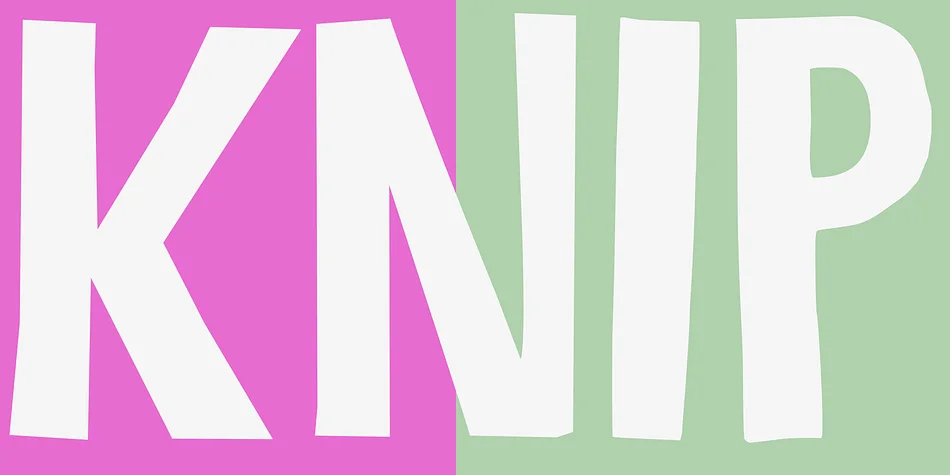
Knip, the Dutch word for "cut", was born from an unconventional process that distinctly sets it apart from typical digital typefaces. Designer Hanoded literally cut letterforms from black paper, layered them against white, then photographed and digitized each one. The result reads like typography that's been painstakingly assembled by hand, with the organic imperfections and tactile character you only get from working with scissors, glue, and a camera.
Hand-cut fonts are rare and labor-intensive endeavors, which is why Hanoded creates them sparingly. The letterforms carry genuine handmade energy through their visible edges and slightly irregular geometry, making each character feel unique and grounded. This decorative typeface works beautifully for greeting cards with real personality, DIY craft signage that demands an artisanal feel, handmade product labels for small-batch goods and boutique brands, scrapbooking layouts where texture matters, and invitation suites. Projects like these benefit from type that looks hand-assembled rather than selected from a font catalog, where the slight irregularities read as charm and character rather than imprecision.
Knip is best suited for makers and designers who understand that a font's personality can carry as much weight as its form and proportions. Find it on Creative Fabrica.
Style & Use Cases
- Overall Style
- Bold, Distinctive
- Use Case
- Headlines, Posters
- Ideal For
- logos, packaging, and standout titles
- Pairs With
- a neutral sans-serif
How to Install Knip Font
Step-by-step instructions for every platform
- 1Download the Knip font file (.ttf or .otf).
- 2Locate the downloaded file in your Downloads folder.
- 3Right-click the font file.
- 4Select "Install" to install for the current user, or "Install for all users" to make it available system-wide.
- 5Knip is now available in Word, Photoshop, Illustrator, and all other apps.
More by Hanoded
View all →
Browse fonts by theme
Curated collections →Saw a font in a picture? Identify any font from an image with our free Font Finder.
More Decorative Fonts
Browse all →







What pairs well with Knip Font?
Knip Font is a decorative font that shines as a display or heading face. Pair it with a clean sans-serif or serif font for body text — the contrast creates a clear hierarchy while the two styles stay balanced and easy to read.




Knip Font
by Hanoded
Reviewed by the FontBoxDL team · Updated June 2026