
 1 / 4
1 / 4About Kagaman Font
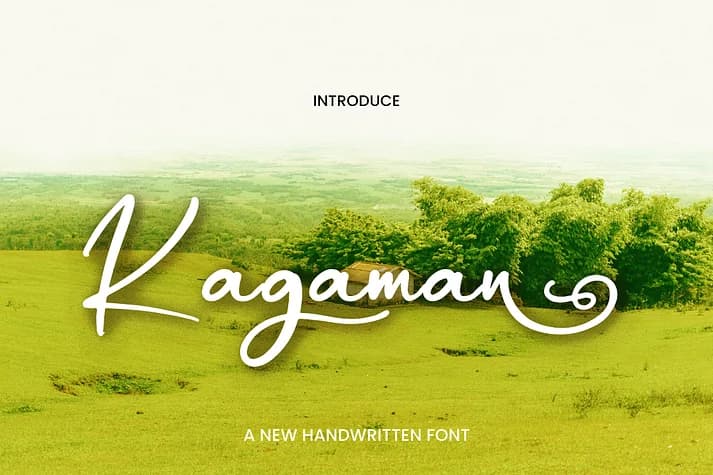
Kagaman by Ayska is a fluid handwriting script that brings genuine character to any design it touches. The font features extensive ligatures that create natural flow between letterforms, giving the work a cohesive, hand-drawn quality. Even at smaller sizes, it maintains clarity while preserving that handcrafted warmth that stops readers in their tracks. Rather than shouting, the script draws people in through its authenticity and presence.
This font works beautifully for wedding invitations, cosmetic product labels, greeting card suites, and small-batch packaging where a personal touch sets you apart. Designers reach for it when they need letterforms that feel genuinely handwritten rather than mechanically produced. The design balances contemporary sensibilities with organic movement, giving you the flexibility to anchor a minimalist layout or let it stand alone as a bold focal point. Ligatures flow naturally between letters, building momentum and rhythm across words and phrases. The overall approach sidesteps trendiness and unnecessary flourish, keeping your message and the intentional craftsmanship front and center. Kagaman proves that handwritten typography doesn't need to be frilly or overdone to be effective.
You'll find Kagaman available on Creative Fabrica and ready to use in your next design.
Style & Use Cases
- Overall Style
- Elegant, Flowing
- Use Case
- Invitations, Branding
- Ideal For
- wedding stationery, greeting cards, and signatures
- Pairs With
- a simple uppercase sans
How to Install Kagaman Font
Step-by-step instructions for every platform
- 1Download the Kagaman font file (.ttf or .otf).
- 2Locate the downloaded file in your Downloads folder.
- 3Right-click the font file.
- 4Select "Install" to install for the current user, or "Install for all users" to make it available system-wide.
- 5Kagaman is now available in Word, Photoshop, Illustrator, and all other apps.
More Script Handwritten Fonts
Browse all →







What pairs well with Kagaman Font?
Kagaman Font is a script font that shines as a display or heading face. Pair it with a clean sans-serif or serif font for body text — the contrast creates a clear hierarchy while the two styles stay balanced and easy to read.



Kagaman Font
by Ayska
Reviewed by the FontBoxDL team · Updated July 2026