 Firefox
 1 / 10
About Just Pixo Font
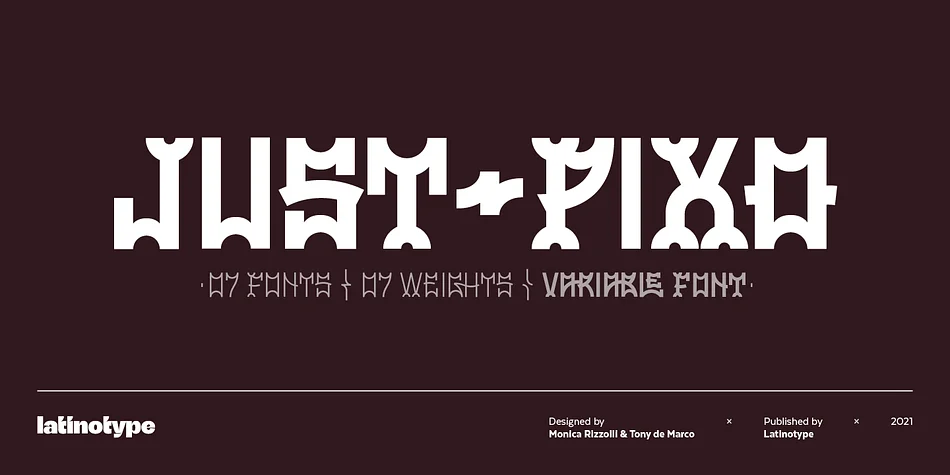
Just Pixo by Latinotype draws its spirit from pixação, the bold vertical lettering tradition found throughout São Paulo's urban landscape. The typeface translates street art energy into a structured display family with real staying power. Seven weights, variable font compatibility, decorative serif capitals paired with clean lowercase sans forms, and a rich set of alternate glyphs give you serious flexibility at any scale.
This typeface excels for album cover typography, urban fashion branding, music festival posters, and gallery installation signage where raw architectural presence matters more than subtlety. The extreme verticality and architectural weight built into each letterform command attention and ground contemporary design concepts rooted in street culture. Build nightlife venue materials, skateboard graphics, or contemporary editorial spreads, and Just Pixo brings structural boldness without apology.
The combination of weighted characters and multiple ligatures makes this typeface responsive to how you deploy it, rewarding both typographic restraint and confident oversized applications. Anchoring a headline, building a logo system, or establishing the visual voice for a culture-forward brand, the typeface carries the graphic authority that comes from real streets and real tradition. If you're drawn to display typefaces with cultural grounding and visual muscle, Just Pixo belongs in your active collection. Grab it on Creative Fabrica.
Style & Use Cases
- Overall Style
- Eye-catching, Bold
- Use Case
- Headlines, Logos
- Ideal For
- posters, branding, and social media graphics
- Pairs With
- a readable sans or serif for body
How to Install Just Pixo Font
Step-by-step instructions for every platform
- 1Download the Just Pixo font file (.ttf or .otf).
- 2Locate the downloaded file in your Downloads folder.
- 3Right-click the font file.
- 4Select "Install" to install for the current user, or "Install for all users" to make it available system-wide.
- 5Just Pixo is now available in Word, Photoshop, Illustrator, and all other apps.
More by Latinotype
View all →

Browse fonts by theme
Curated collections →Saw a font in a picture? Identify any font from an image with our free Font Finder.
More Display Fonts
Browse all →







What pairs well with Just Pixo Font?
Just Pixo Font is a display font that shines as a display or heading face. Pair it with a clean sans-serif or serif font for body text — the contrast creates a clear hierarchy while the two styles stay balanced and easy to read.




Just Pixo Font
by Latinotype
Reviewed by the FontBoxDL team · Updated September 2026