 Firefox
 1 / 8
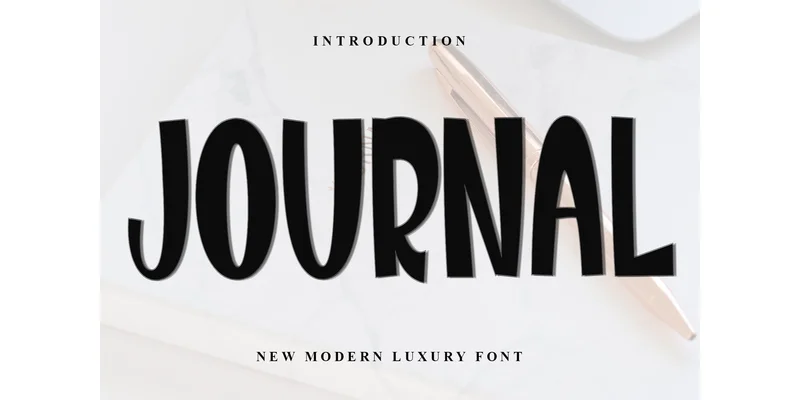
1 / 8About Journal Font
Journal has a graceful, refined quality that balances formal elegance with approachable warmth. Designed by Inermedia STUDIO, this display font weaves calligraphic flourishes into a contemporary framework, creating something both distinctive and genuinely usable across diverse design applications.
It excels in wedding invitation suites, high-end beauty product labels, boutique skincare packaging, and signature logo applications. Its decorative character reads as sophisticated rather than novelty, making it work equally well for luxury branding, personal projects, and seasonal campaigns. With a romantic lean that avoids overwrought territory, it offers real design flexibility and visual impact. Because it's PUA encoded, you gain immediate access to a full library of glyphs and ligatures, enabling you to craft complex letterforms and ornamental details without limitation. One font file handles multiple design needs, eliminating the constant need to juggle variations.
Pair Journal with a clean, minimal sans-serif for body copy and supporting metadata, and you create natural visual hierarchy that guides the reader's eye through the page. The contrast between its decorative personality and understated simplicity works surprisingly well in layouts of any scale. Find it on Creative Fabrica and add a typeface that brings genuine dimension to your next project.
Style & Use Cases
- Overall Style
- Eye-catching, Bold, 4th Of July
- Use Case
- Headlines, Logos
- Ideal For
- posters, branding, and social media graphics
- Pairs With
- a readable sans or serif for body
How to Install Journal Font Font
Step-by-step instructions for every platform
- 1Download the Journal Font font file (.ttf or .otf).
- 2Locate the downloaded file in your Downloads folder.
- 3Right-click the font file.
- 4Select "Install" to install for the current user, or "Install for all users" to make it available system-wide.
- 5Journal Font is now available in Word, Photoshop, Illustrator, and all other apps.
More by Inermedia STUDIO
View all →

Browse fonts by theme
Curated collections →Saw a font in a picture? Identify any font from an image with our free Font Finder.
More Display Fonts
Browse all →







What pairs well with Journal Font?
Journal Font is a display font that shines as a display or heading face. Pair it with a clean sans-serif or serif font for body text — the contrast creates a clear hierarchy while the two styles stay balanced and easy to read.




Journal Font
Reviewed by the FontBoxDL team · Updated October 2026
One-time purchase