 Firefox
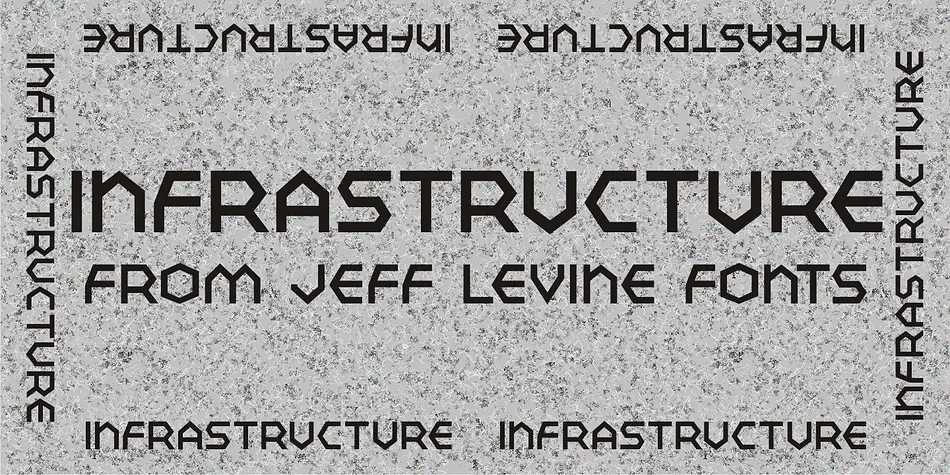
About INFRASTRUCTURE JNL Font
The sharp geometric shapes in Infrastructure JNL come directly from 1930s travel poster design. Jeff Levine based this display font on the hexagon-inspired lettering that appeared in WPA-era "See America" campaigns, capturing that era's bold angular industrial spirit with clear intention and precision. The letterforms sit at the crossroads of Art Deco geometry and utilitarian drafting, combining precise angles and structural weight in ways that grab attention without losing legibility at any size.
This font strengthens vintage concert posters, speakeasy signage, and record label designs that need authentic period character. Art Deco revival projects, craft brewery packaging, and marquee signs for independent movie theaters all benefit from the confidence these letterforms carry. You'll find it equally effective for tattoo shop branding, heritage brand identities, and retro product packaging when you want a pre-war industrial aesthetic without settling for a generic template. The angular construction works beautifully at display sizes, making it practical for headlines and signage while remaining visually compelling across almost any context or application.
If your work gravitates toward nostalgia, Americana, or Art Deco revival, Infrastructure JNL warrants a close look. Grab it on Creative Fabrica and bring genuine 1930s backbone and authority to your next design project.
Style & Use Cases
- Overall Style
- Eye-catching, Bold
- Use Case
- Headlines, Logos
- Ideal For
- posters, branding, and social media graphics
- Pairs With
- a readable sans or serif for body
How to Install INFRASTRUCTURE JNL Font
Step-by-step instructions for every platform
- 1Download the INFRASTRUCTURE JNL font file (.ttf or .otf).
- 2Locate the downloaded file in your Downloads folder.
- 3Right-click the font file.
- 4Select "Install" to install for the current user, or "Install for all users" to make it available system-wide.
- 5INFRASTRUCTURE JNL is now available in Word, Photoshop, Illustrator, and all other apps.
More by Jeff Levine Fonts
View all →



Browse fonts by theme
Curated collections →Saw a font in a picture? Identify any font from an image with our free Font Finder.
More Display Fonts
Browse all →







What pairs well with INFRASTRUCTURE JNL Font?
INFRASTRUCTURE JNL Font is a display font that shines as a display or heading face. Pair it with a clean sans-serif or serif font for body text — the contrast creates a clear hierarchy while the two styles stay balanced and easy to read.




INFRASTRUCTURE JNL Font
Reviewed by the FontBoxDL team · Updated September 2026