Firefox

 1 / 3
Loading font…
About Hex Font
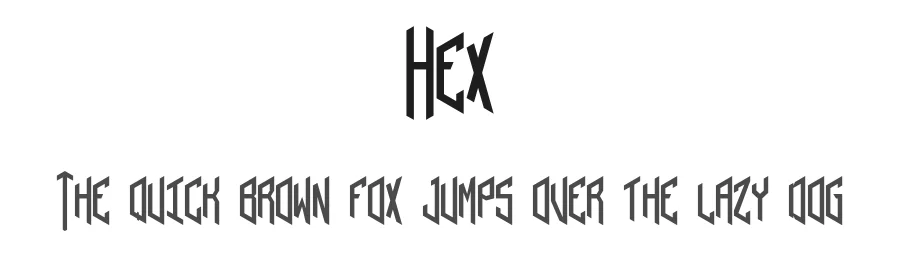
Hex is a type-able three letter hexagonal monogram font.
Thats all it does.
You can type a Hexagonal Monogram with a border. Two styles are included, Monogram or Ornate, which has serifs and median spurs.
It requires Discretionary Ligatures to be supported AND enabled to work out of the box, so please check the read me pdf for details of how to use it and for useful links to show you applications that support Open Type features it relies on to work (thanks Vinz).
Hex is usable without the Dlig features enabled, but you will have to locate the final glyph in any monogram in glyphs panel, character viewer or whatever to add it. You can mix and match Hex Monogram and Hex Ornate in the same monogram, but only manually.
The Read Me pdf also contains a key map showing you where the borders and a few special characters are located, (including a Mc Ligature, for our Scottish cousins. Thanks Claude) so seriously, read it!
Hex was created as a personal project to learn how to use Dlig features and as such is served to you 100% free and as is.
If you like Hex, feel free to show your appreciation by making a modest donation to the Prevent the Wolf Door Convergence fund using the donate button. Should you have the good fortune to find a commercial project its suitable for, similarly, sharing some of your good fortune with a small donation would be considered good manners.
Thanks to the naughty mods and staff of Dafont, as ever for getting me up and running.
Hope you enjoy.
Pil
Style & Use Cases
- Overall Style
- Ornate, Gothic, Gothic
- Use Case
- Logos, Certificates
- Ideal For
- medieval themes, band merch, and tattoo lettering
- Pairs With
- a clean sans-serif for body text
OpenType Features
Hex ships with 1 OpenType feature you can switch on in apps that support them (Illustrator, InDesign, Affinity, Figma, CSS font-feature-settings).
- Discretionary ligatures
How to Install Hex Font
Step-by-step instructions for every platform
- 1Download the Hex font file (.ttf or .otf).
- 2Locate the downloaded file in your Downloads folder.
- 3Right-click the font file.
- 4Select "Install" to install for the current user, or "Install for all users" to make it available system-wide.
- 5Hex is now available in Word, Photoshop, Illustrator, and all other apps.
More by Pilaster Davy
View all →


Browse fonts by theme
Curated collections →Saw a font in a picture? Identify any font from an image with our free Font Finder.
More Blackletter Fonts
Browse all →
What pairs well with Hex Font?
Hex Font is a blackletter font that shines as a display or heading face. Pair it with a clean serif or sans-serif font for body text — the contrast creates a clear hierarchy while the two styles stay balanced and easy to read.




Premium Blackletter Fonts
★ PremiumWant something with more weights, glyphs, and commercial polish? These premium blackletter fonts are worth a look.