 Firefox
 1 / 3
1 / 3Loading font…
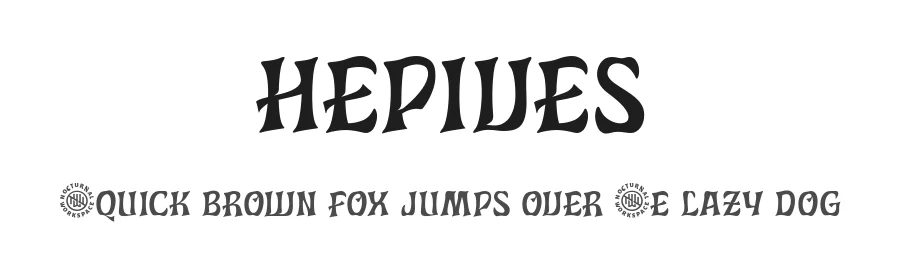
About Hepives Font
Hepives strikes a careful balance between visual elegance and deliberate restraint. Designed by Tirta Sudibya, this light display font commands attention without resorting to aggressive styling, relying instead on refined letterforms and generous spacing to guide the viewer's eye through any layout with genuine ease. Set it large for headlines or stretch it across editorial spreads and it maintains that same sense of calm authority, never tipping into overstatement or excess. Its versatility across different scales is one of its genuine strengths.
The 205+ language support across Latin-based characters makes it genuinely useful for projects that cross borders and reach multilingual audiences around the world. Magazine cover headlines, art gallery announcement posters, nonprofit gala invitations, and boutique brand identities for minimalist retailers all find their natural home in this typeface. Where typography tries to whisper rather than shout, this light weight reinforces the message without feeling weak or unsupported in any context. That balance is something many designers chase but few manage to achieve. Controlled typography at this level requires real craft and intentional design.
Editorial design and branding work are where Hepives performs best. Free demo for personal use here, full commercial version on Creative Fabrica.
Style & Use Cases
- Overall Style
- Light, Eye-catching, Bold, Display
- Use Case
- Headlines, Logos
- Ideal For
- posters, branding, and social media graphics
- Pairs With
- a readable sans or serif for body
Hepives Specifications
| Font Family | Hepives Light |
| Style | Light |
| Full Name | Hepives Light Light |
| Version | 1.00 |
| Weight | 300 (Light) |
| Glyph Count | 202 glyphs |
| PostScript Name | HepivesLight-Light |
| Designer | Tirta Sudibya |
| Format | TTF (TrueType) |
| File Size | 569.2 KB |
OpenType Features
Hepives ships with 1 OpenType feature you can switch on in apps that support them (Illustrator, InDesign, Affinity, Figma, CSS font-feature-settings).
- Standard ligatures
Languages Supported
Hepives supports 205 languages.
How to Install Hepives Font
Step-by-step instructions for every platform
- 1Download the Hepives font file (.ttf or .otf).
- 2Locate the downloaded file in your Downloads folder.
- 3Right-click the font file.
- 4Select "Install" to install for the current user, or "Install for all users" to make it available system-wide.
- 5Hepives is now available in Word, Photoshop, Illustrator, and all other apps.
More by Tirta Sudibya
View all →
Browse fonts by theme
Curated collections →Saw a font in a picture? Identify any font from an image with our free Font Finder.
More Display Fonts
Browse all →







What pairs well with Hepives Font?
Hepives Font is a display font that shines as a display or heading face. Pair it with a clean sans-serif or serif font for body text — the contrast creates a clear hierarchy while the two styles stay balanced and easy to read.




Hepives Font
Reviewed by the FontBoxDL team · Updated August 2026