 Firefox
About HATCHERY JNL Font
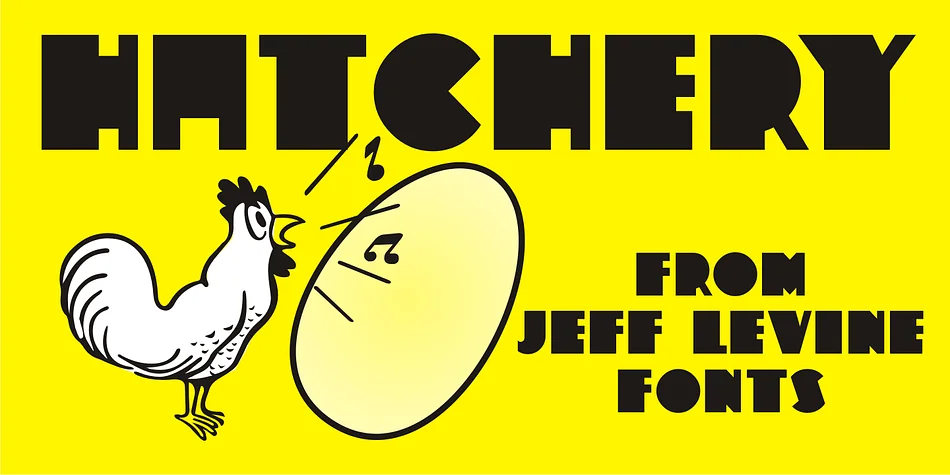
Picture a 1930s storefront sign glowing in the afternoon light, its bold blocky letterforms catching the eye against vintage wood. That's the aesthetic of Hatchery JNL, created by Jeff Levine Fonts from a vintage photograph of the historic Lasher Hatchery signage, a contribution from designer Gene Gable. The font captures authentic Art Deco geometry without feeling heavy-handed or overly nostalgic in the way some retro fonts do. Its name carries clever meaning too: good ideas, like eggs, need the right conditions to hatch and develop into something real and lasting.
This display font works beautifully across vintage branding projects, Art Deco poster design, and custom signage where bold character is the goal. You'll find it particularly strong for craft beer label design, speakeasy and cocktail bar menus, vintage recipe blog headers, and independent bookstore signage. The solid letterform construction means each character holds its own beautifully at large sizes, making it reliable for storefront applications and print campaigns where legibility and impact matter equally. At smaller scales, the balanced proportions and consistent weight translate gracefully to book covers, product packaging labels, and other marketing collateral where you want that authentic 1930s sensibility without looking like you borrowed someone else's period piece.
Bring Hatchery JNL into your Creative Fabrica library and infuse your vintage design projects with genuine historical style.
Style & Use Cases
- Overall Style
- Eye-catching, Bold
- Use Case
- Headlines, Logos
- Ideal For
- posters, branding, and social media graphics
- Pairs With
- a readable sans or serif for body
How to Install HATCHERY JNL Font
Step-by-step instructions for every platform
- 1Download the HATCHERY JNL font file (.ttf or .otf).
- 2Locate the downloaded file in your Downloads folder.
- 3Right-click the font file.
- 4Select "Install" to install for the current user, or "Install for all users" to make it available system-wide.
- 5HATCHERY JNL is now available in Word, Photoshop, Illustrator, and all other apps.
More by Jeff Levine Fonts
View all →



Browse fonts by theme
Curated collections →Saw a font in a picture? Identify any font from an image with our free Font Finder.
More Display Fonts
Browse all →







What pairs well with HATCHERY JNL Font?
HATCHERY JNL Font is a display font that shines as a display or heading face. Pair it with a clean sans-serif or serif font for body text — the contrast creates a clear hierarchy while the two styles stay balanced and easy to read.




HATCHERY JNL Font
Reviewed by the FontBoxDL team · Updated September 2026