 Firefox
 1 / 10
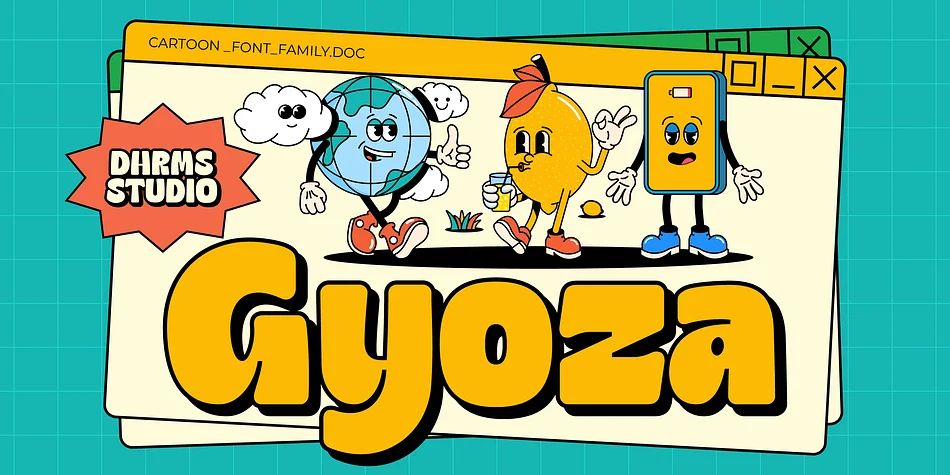
About Gyoza Font
Introducing Gyoza - Font Family (4 Fonts)
Gyoza - was designed in late 2022 and published on January 2023. The Typeface was inspired by the 90’s playful cartoons and comic books. This font comes with 4 weights; Regular, Semibold, Bold, and Black.
Gyoza - available with the variable fonts in weights and the Ink Trap. With the regular style, you’ll have the correct anatomy of the fonts. with the Ink Trap style, it added more extreme space on the Ink Trap.
Gyoza - contains everything you need to create stunning typography – from headline fonts to body text fonts - all in one place. Whether you’re starting out or you’ve been designing for years, Gyoza has everything you need. Can be used for modern and vintage designs, and also can be easily paired with some graphic elements (Illustration, Photography) this font is perfect for, Logotype, Branding, Title, and Packaging.
So take your design skills up a notch and get started on some fresh new projects with Gyoza today!
What you get :
- Gyoza Regular
- Gyoza Semibold
- Gyoza Bold
- Gyoza Black
Features :
- TTF, OTF, WOFF, WOFF2
- Ligatures
- Instructions ( Access special characters, even in circuit design )
- Letters, numbers, symbols, and punctuation
- No special software is required to use this typeface even work in Canva
- Multilingual Support
Language Support: Danish, English, Estonian, Filipino, Finnish, French, Friulian, Galician, German, Gusii, Indonesian, Irish, Italian, Luxembourgish, Norwegian Bokmål, Norwegian Nynorsk, Nyankole, Oromo, Portuguese, Romansh, Rombo, Spanish, Swedish, Swiss-German, Uzbek (Latin)
Please contact us if you have any questions. Enjoy crafting and thanks for supporting us!
Come and say hello over on Instagram! https://www.instagram.com/dharmas.studio/
Regards,
Dharmas Studio
Style & Use Cases
- Overall Style
- Eye-catching, Bold
- Use Case
- Headlines, Logos
- Ideal For
- posters, branding, and social media graphics
- Pairs With
- a readable sans or serif for body
How to Install Gyoza Font
Step-by-step instructions for every platform
- 1Download the Gyoza font file (.ttf or .otf).
- 2Locate the downloaded file in your Downloads folder.
- 3Right-click the font file.
- 4Select "Install" to install for the current user, or "Install for all users" to make it available system-wide.
- 5Gyoza is now available in Word, Photoshop, Illustrator, and all other apps.
More by Dharmas Studio
View all →
Browse fonts by theme
Curated collections →Saw a font in a picture? Identify any font from an image with our free Font Finder.
More Display Fonts
Browse all →







What pairs well with Gyoza Font?
Gyoza Font is a display font that shines as a display or heading face. Pair it with a clean sans-serif or serif font for body text — the contrast creates a clear hierarchy while the two styles stay balanced and easy to read.




Gyoza Font
Reviewed by the FontBoxDL team · Updated April 2026