 Firefox
 1 / 9
1 / 9About Graphemic Font
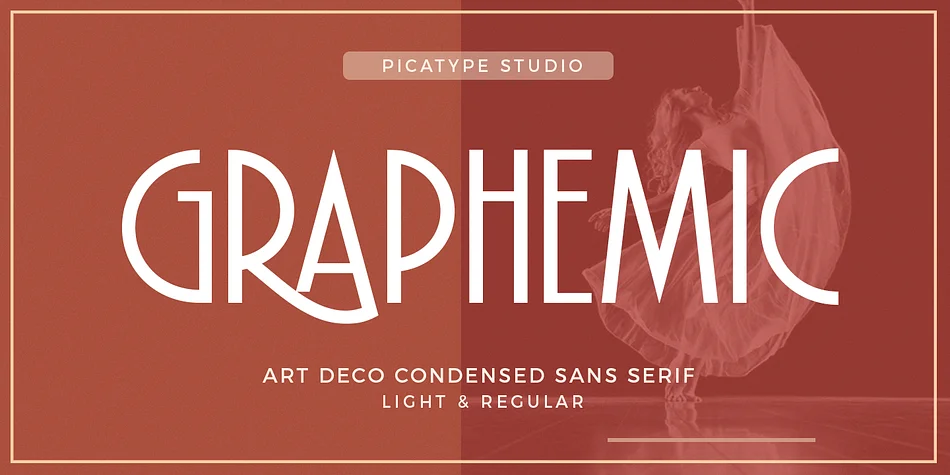
You're designing a horror film poster or laying out a luxury book cover, and you need display type with real weight and character. Graphemic, designed by Picatype Studio, channels medieval woodcut aesthetics into a typeface built for contemporary design work. The design pairs deliberate, weighty strokes with the organic curves you find in historical letterforms, creating substantial visual presence that commands attention.
This typeface works particularly well for indie film titles, collector's edition book covers, art gallery announcements, craft brewery labels, and theater promotion posters. The medieval influences feel intentional rather than retro, making it suitable for projects that need personality without looking dated or nostalgic. Set it for bold headlines or use it as a display accent, and the letterforms remain readable while maintaining their distinctive character.
The typeface ships in both Regular and Light weights, giving you flexibility for building visual hierarchy while keeping the historical mood consistent across your work. Each weight comes with full language support plus extended numbers and punctuation marks, so the character set handles most projects. The letterforms hold their personality at large display sizes, which matters for packaging, signage, and poster work where typography becomes a core design element. Find it on Creative Fabrica.
Style & Use Cases
- Overall Style
- Bold, Distinctive
- Use Case
- Headlines, Posters
- Ideal For
- logos, packaging, and standout titles
- Pairs With
- a neutral sans-serif
How to Install Graphemic Font
Step-by-step instructions for every platform
- 1Download the Graphemic font file (.ttf or .otf).
- 2Locate the downloaded file in your Downloads folder.
- 3Right-click the font file.
- 4Select "Install" to install for the current user, or "Install for all users" to make it available system-wide.
- 5Graphemic is now available in Word, Photoshop, Illustrator, and all other apps.
More by Picatype Studio
View all →
Browse fonts by theme
Curated collections →Saw a font in a picture? Identify any font from an image with our free Font Finder.
More Decorative Fonts
Browse all →







What pairs well with Graphemic Font?
Graphemic Font is a decorative font that shines as a display or heading face. Pair it with a clean sans-serif or serif font for body text — the contrast creates a clear hierarchy while the two styles stay balanced and easy to read.




Graphemic Font
Reviewed by the FontBoxDL team · Updated June 2026