 Firefox
 1 / 5
1 / 5About Fortune Teller Font
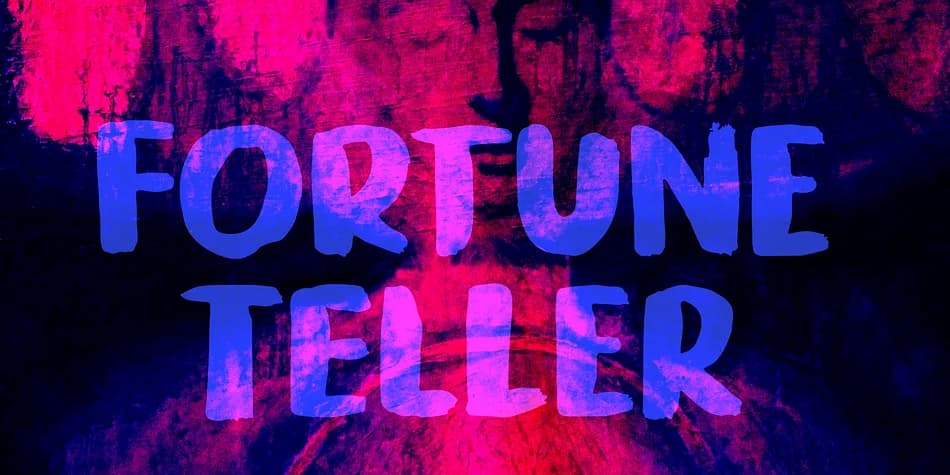
Fortune Teller by Kitchen Table Type Foundry is a brush display font with organic, handcrafted character that feels genuinely personal. The designer created it using traditional Chinese calligraphy tools and ink inherited from a family member, giving the typeface an authentic, flowing quality that digital brushes rarely capture. This heritage shows in every stroke.
This font works beautifully for labels on artisanal botanical skincare, mystical event posters, custom wine label designs, and indie zine covers where personality matters more than perfection. The brushstrokes show real energy, with genuine texture and variation in every letter that you don't get from algorithmic sources. It includes a full set of diacritics for international language support, plus alternate glyphs that let you swap out letters for fresh visual options depending on your design direction.
The irregularity here is its real strength. Fortune Teller shines when you want your design to feel made by human hands rather than machines, whether for wedding stationery that needs character, occult shop branding that demands authenticity, or book covers seeking warmth and soul. Most brush fonts feel pretty after rendering. This one keeps the imperfection and humanity that makes handmade type magnetic. Grab Fortune Teller on Creative Fabrica and add this handmade quality to your next project.
Style & Use Cases
- Overall Style
- Eye-catching, Bold
- Use Case
- Headlines, Logos
- Ideal For
- posters, branding, and social media graphics
- Pairs With
- a readable sans or serif for body
How to Install Fortune Teller Font
Step-by-step instructions for every platform
- 1Download the Fortune Teller font file (.ttf or .otf).
- 2Locate the downloaded file in your Downloads folder.
- 3Right-click the font file.
- 4Select "Install" to install for the current user, or "Install for all users" to make it available system-wide.
- 5Fortune Teller is now available in Word, Photoshop, Illustrator, and all other apps.
More by Kitchen Table Type Foundry
View all →


Browse fonts by theme
Curated collections →Saw a font in a picture? Identify any font from an image with our free Font Finder.
More Display Fonts
Browse all →







What pairs well with Fortune Teller Font?
Fortune Teller Font is a display font that shines as a display or heading face. Pair it with a clean sans-serif or serif font for body text — the contrast creates a clear hierarchy while the two styles stay balanced and easy to read.



Fortune Teller Font
Reviewed by the FontBoxDL team · Updated June 2026