
 1 / 5
1 / 5About Elfenbankje Font
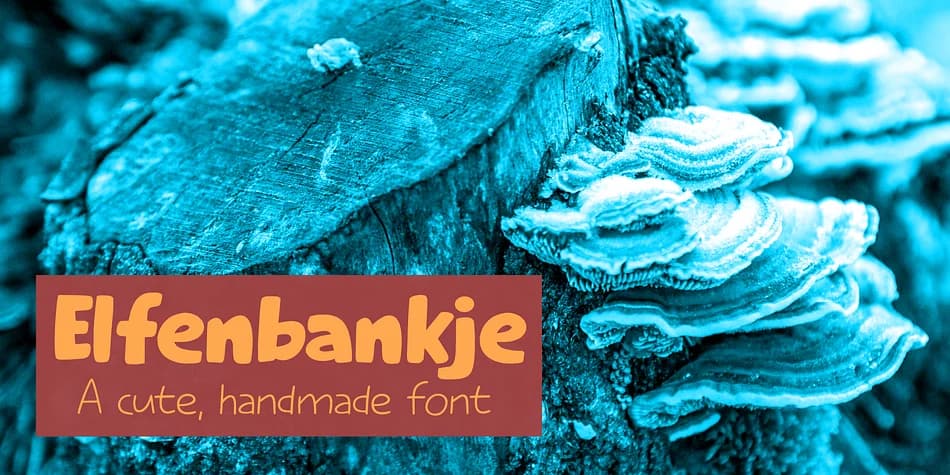
Elfenbankje by Kitchen Table Type Foundry is a playful decorative family with a whimsical spirit. The name carries a story: it's the Dutch term for a small mushroom (Turkey Tail) that the designer spotted repeatedly while on nature walks with their kids. That sense of discovery and joy translates directly into the typeface's character, giving it a personality that's both functional and playful.
The family consists of two weights: a bold, chunky version and a lighter companion that both maintain the same friendly personality. This versatility makes the pair work beautifully together for layered designs or when you need contrast without losing cohesion. You'll find Elfenbankje fits naturally into greeting card designs, children's book covers, boutique logo treatments, and playful product packaging. It also handles hand-drawn poster layouts, scrapbooking projects, and DIY craft signage with equal charm.
The fungus-inspired story behind the name might sound unusual, but it captures what makes this font genuinely special: it's something you discover rather than something immediately obvious, something that feels natural and a little bit unexpected. Its warmth and character make it work across different design contexts. If your projects need authentic, approachable energy without trying too hard, grab Elfenbankje from Creative Fabrica and see how it brings a touch of forest magic to your work.
Style & Use Cases
- Overall Style
- Bold, Distinctive
- Use Case
- Headlines, Posters
- Ideal For
- logos, packaging, and standout titles
- Pairs With
- a neutral sans-serif
How to Install Elfenbankje Font
Step-by-step instructions for every platform
- 1Download the Elfenbankje font file (.ttf or .otf).
- 2Locate the downloaded file in your Downloads folder.
- 3Right-click the font file.
- 4Select "Install" to install for the current user, or "Install for all users" to make it available system-wide.
- 5Elfenbankje is now available in Word, Photoshop, Illustrator, and all other apps.
More by Kitchen Table Type Foundry
View all →


More Decorative Fonts
Browse all →







What pairs well with Elfenbankje Font?
Elfenbankje Font is a decorative font that shines as a display or heading face. Pair it with a clean sans-serif or serif font for body text — the contrast creates a clear hierarchy while the two styles stay balanced and easy to read.



Elfenbankje Font
Reviewed by the FontBoxDL team · Updated June 2026