 Firefox
 1 / 10
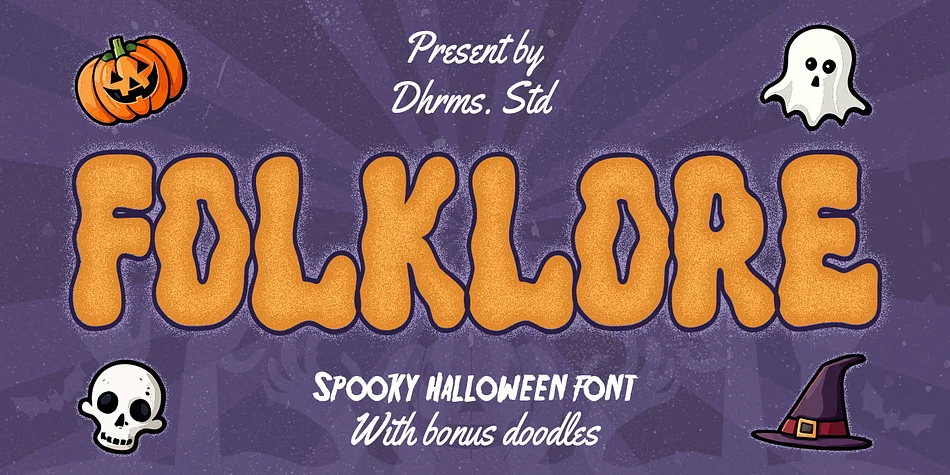
About FOLKLORE Font
Just in time for your Halloween projects hopefully :)
Say hello to Folklore! A font that’s all about spooky, ghoulish fun! With its charming all caps style and built-in speckly texture, Folklore brings a touch of whimsy to your creative projects. Plus, we’ve included an Outline version of the font as a little bonus.
But that’s not all – to spark your creativity, we’ve thrown in the doodles used in these previews for free! ????????
What’s Included?
- Folklore TTF, OTF, WOFF, and WOFF2
- Regular and Outline version
- 50 free doodles with Halloween theme
- Instructions (Access special characters, even in Cricut Design)
- Unique Letterforms
- Works on PC & Mac
- Simple Installations
- Accessible in Adobe Illustrator, Adobe Photoshop, Microsoft Word even Canva!
- PUA Encoded Characters. Fully accessible without additional design software.
Multilingual Supports: (Afrikaans, Albanian, Catalan, Croatian, Czech, Danish, Dutch, English, Estonian, Finnish, French, German, Hungarian, Icelandic, Italian, Lithuanian, Maltese, Norwegian, Polish, Portuguese, Slovenian, Spanish, Swedish, Turkish, Zulu)
Come and say hello over on Instagram! https://www.instagram.com/dharmas.studio/
Thank you,
Dharmas Studio
Style & Use Cases
- Overall Style
- Eye-catching, Bold
- Use Case
- Headlines, Logos
- Ideal For
- posters, branding, and social media graphics
- Pairs With
- a readable sans or serif for body
How to Install FOLKLORE Font
Step-by-step instructions for every platform
- 1Download the FOLKLORE font file (.ttf or .otf).
- 2Locate the downloaded file in your Downloads folder.
- 3Right-click the font file.
- 4Select "Install" to install for the current user, or "Install for all users" to make it available system-wide.
- 5FOLKLORE is now available in Word, Photoshop, Illustrator, and all other apps.
More by Dharmas Studio
View all →
Browse fonts by theme
Curated collections →Saw a font in a picture? Identify any font from an image with our free Font Finder.
More Display Fonts
Browse all →







What pairs well with FOLKLORE Font?
FOLKLORE Font is a display font that shines as a display or heading face. Pair it with a clean sans-serif or serif font for body text — the contrast creates a clear hierarchy while the two styles stay balanced and easy to read.




FOLKLORE Font
Reviewed by the FontBoxDL team · Updated April 2026