 Firefox
 1 / 5
1 / 5About Exterior Signage JNL Font
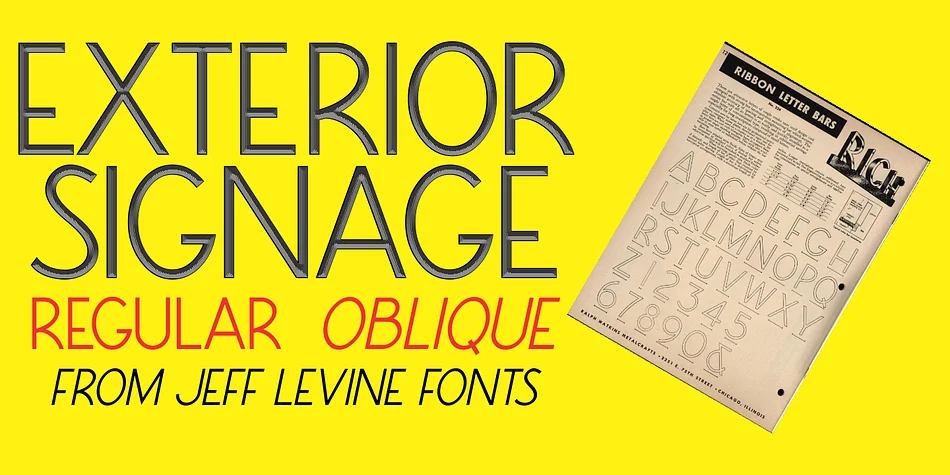
Jeff Levine's Exterior Signage JNL pulls its clean, geometric letterforms directly from a 1960 metalcraft catalog published by Ralph Watkins of Chicago. The monoline, ribbon-style construction carries subtle Art Deco proportions that anchor it firmly in mid-century modern territory. What makes this typeface work is its honesty: it captures the visual language of fabricated metal signage without veering into cartoon territory or laying the nostalgia on too thick. That restraint is precisely what lets it function in contemporary design alongside period-specific projects.
You'll want this typeface for retro diner menus, vinyl-cut exterior storefront signage, and vintage product packaging that needs genuine period character. Speakeasy and cocktail bar branding benefit from its authentic mid-century attitude. The same sensibility applies to DIY craft signs, boutique packaging with a vintage lean, and environmental graphics where that metalwork heritage tells part of the brand story. Both regular and oblique weights ship with the font, giving you two distinct options for creating emphasis and managing visual hierarchy.
Designers and makers working in retro revival, signage design, and vintage brand storytelling will find this a natural choice. It's built for projects where that 1960s metalcraft aesthetic isn't mere decoration but part of the narrative. Grab it on Creative Fabrica.
Style & Use Cases
- Overall Style
- Eye-catching, Bold
- Use Case
- Headlines, Logos
- Ideal For
- posters, branding, and social media graphics
- Pairs With
- a readable sans or serif for body
How to Install Exterior Signage JNL Font
Step-by-step instructions for every platform
- 1Download the Exterior Signage JNL font file (.ttf or .otf).
- 2Locate the downloaded file in your Downloads folder.
- 3Right-click the font file.
- 4Select "Install" to install for the current user, or "Install for all users" to make it available system-wide.
- 5Exterior Signage JNL is now available in Word, Photoshop, Illustrator, and all other apps.
More by Jeff Levine Fonts
View all →



Browse fonts by theme
Curated collections →Saw a font in a picture? Identify any font from an image with our free Font Finder.
More Display Fonts
Browse all →







What pairs well with Exterior Signage JNL Font?
Exterior Signage JNL Font is a display font that shines as a display or heading face. Pair it with a clean sans-serif or serif font for body text — the contrast creates a clear hierarchy while the two styles stay balanced and easy to read.




Exterior Signage JNL Font
Reviewed by the FontBoxDL team · Updated September 2026