 Firefox
 1 / 10
About Epoxy Font
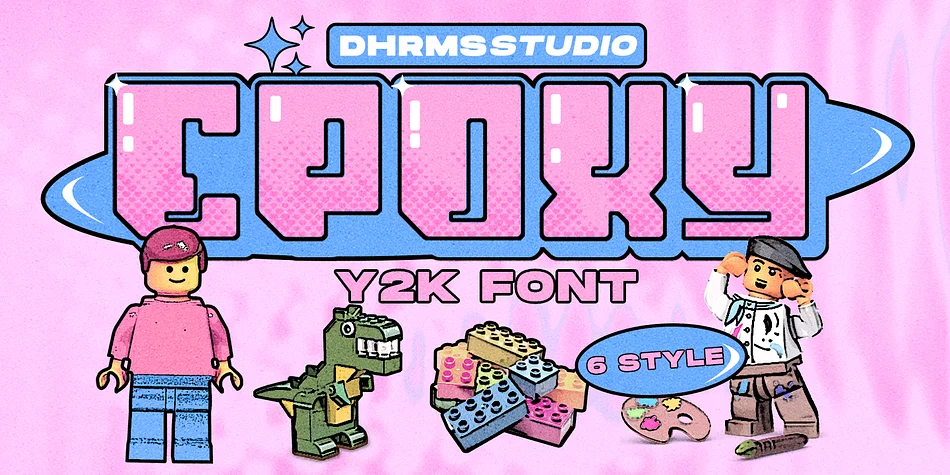
Say hello to new Y2K Family Fonts, EPOXY!
EPOXY - A font that exudes the playful and iconic vibes of the y2k era, inspired by the beloved Barbie cartoon style, where all hues are dipped in pretty pink. With 6 captivating styles for each type - Regular, Italic, Outline, Extrude, Outline Italic, and Extrude Italic - EPOXY brings the nostalgia of the 00’s back to life.
Step into a world filled with the charm of the past, as the Docs, Game Boys, and Cartoons take center stage once more. The 00’s are making a glorious comeback, and “EPOXY” is your perfect companion to embrace the vibrant and joyous essence of that era.
Get ready to embark on a playful journey with EPOXY!
Features:
- Epoxy TTF, OTF, WOFF, and WOFF2
- Has 6 Variable: Regular, Italic, Outline, Extrude, Outline Italic, and Extrude Italic
- Instructions (Access special characters, even in Cricut Design)
- Unique Letterforms
- Works on PC & Mac
- Simple Installations
- Accessible in Adobe Illustrator, Adobe Photoshop, Microsoft Word even work on Canva!
- PUA Encoded Characters
- Fully accessible without additional design software.
Follow my shop for upcoming updates, and for more of my work, and come say hello over on Instagram! https://www.instagram.com/dharmas.studio/
Enjoy Designing!
Dharmas Studio
Style & Use Cases
- Overall Style
- Eye-catching, Bold
- Use Case
- Headlines, Logos
- Ideal For
- posters, branding, and social media graphics
- Pairs With
- a readable sans or serif for body
How to Install Epoxy Font
Step-by-step instructions for every platform
- 1Download the Epoxy font file (.ttf or .otf).
- 2Locate the downloaded file in your Downloads folder.
- 3Right-click the font file.
- 4Select "Install" to install for the current user, or "Install for all users" to make it available system-wide.
- 5Epoxy is now available in Word, Photoshop, Illustrator, and all other apps.
More by Dharmas Studio
View all →
Browse fonts by theme
Curated collections →Saw a font in a picture? Identify any font from an image with our free Font Finder.
More Display Fonts
Browse all →







What pairs well with Epoxy Font?
Epoxy Font is a display font that shines as a display or heading face. Pair it with a clean sans-serif or serif font for body text — the contrast creates a clear hierarchy while the two styles stay balanced and easy to read.




Epoxy Font
Reviewed by the FontBoxDL team · Updated April 2026