 Firefox
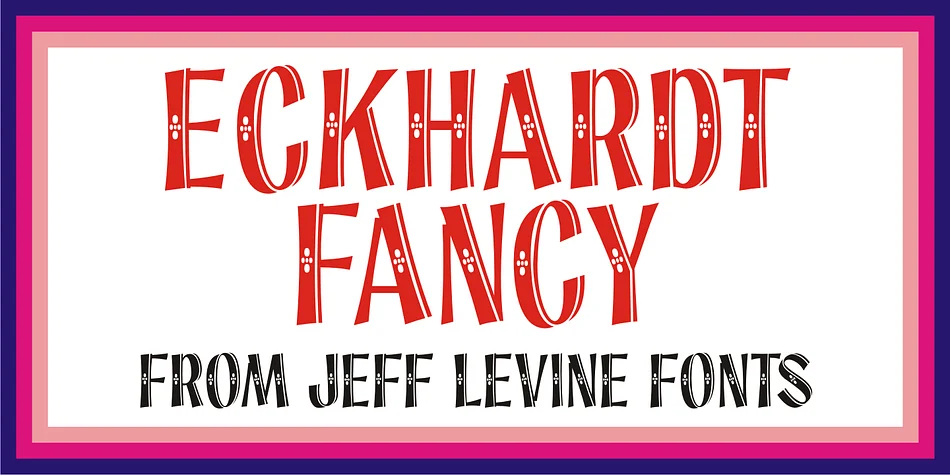
About ECKHARDT FANCY JNL Font
ECKHARDT FANCY JNL by Jeff Levine Fonts is a display typeface with roots in classic hand-lettered signage traditions. The design draws inspiration from a carefully preserved vintage alphabet, pulling from the remarkable collection of Dan X. Solo, whose archives contain some of the most distinctive letterforms of the mid-20th century.
Jeff Levine named this typeface in tribute to Al Eckhardt (1929-2005), a skilled sign painter whose work exemplified the craft of hand-drawn lettering. That personal connection infuses the font with genuine character, the kind you feel when letterforms were shaped by a steady hand rather than pure geometry. The design carries that warmth across whatever you apply it to.
The decorative weight and personality make it well-suited for vintage poster recreation, retro packaging for indie beauty brands, restaurant menu boards with old-world charm, and antique store signage that captures nostalgic appeal. It also works beautifully for greeting card typography, speakeasy-style event invitations, and letterpress-inspired craft projects where that handmade quality matters. Digital or print alike, this typeface brings authentic period character without feeling forced or derivative.
You can add ECKHARDT FANCY JNL to your library on Creative Fabrica and start bringing vintage authenticity into your next project.
Style & Use Cases
- Overall Style
- Eye-catching, Bold
- Use Case
- Headlines, Logos
- Ideal For
- posters, branding, and social media graphics
- Pairs With
- a readable sans or serif for body
How to Install ECKHARDT FANCY JNL Font
Step-by-step instructions for every platform
- 1Download the ECKHARDT FANCY JNL font file (.ttf or .otf).
- 2Locate the downloaded file in your Downloads folder.
- 3Right-click the font file.
- 4Select "Install" to install for the current user, or "Install for all users" to make it available system-wide.
- 5ECKHARDT FANCY JNL is now available in Word, Photoshop, Illustrator, and all other apps.
More by Jeff Levine Fonts
View all →



Browse fonts by theme
Curated collections →Saw a font in a picture? Identify any font from an image with our free Font Finder.
More Display Fonts
Browse all →







What pairs well with ECKHARDT FANCY JNL Font?
ECKHARDT FANCY JNL Font is a display font that shines as a display or heading face. Pair it with a clean sans-serif or serif font for body text — the contrast creates a clear hierarchy while the two styles stay balanced and easy to read.




ECKHARDT FANCY JNL Font
Reviewed by the FontBoxDL team · Updated September 2026