
 1 / 8
1 / 8About Doodle Arrow Font
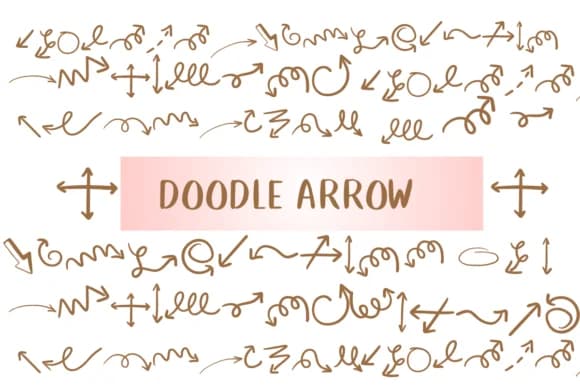
Imagine laying out a scrapbook page or designing stickers for a craft tutorial site: you need directional markers that feel handmade, not sterile. Doodle Arrow by Nongyao delivers exactly that with its collection of playful, hand-drawn arrows that work as dingbat symbols. The typeface gives you control without rigidity, letting designs breathe with genuine character instead of clip-art polish. Each stroke carries weight and personality, the kind of thing that stops someone scrolling and makes them pause.
This one shines in specific niches. Scrapbooking layouts love these arrows because they guide the eye without shouting. Handwritten-style business cards benefit from the playful doodle aesthetic, while DIY planner inserts and digital coloring pages for kids' brands gain an extra layer of warmth. The outline rendering proves its worth in coloring activities, where the line-weight stays readable without overwhelming the design. Craft-focused projects that would choke on traditional arrows find their answer here. Just pick an arrow and place it. The style does the heavy lifting.
Each one retains that pencil-sketch quality that makes hand-drawn composition feel intentional rather than lazy. The font scales beautifully, from small accent marks on product labels to larger directional elements in poster layouts for indie publishers. If you're building a practical library of dingbats for regular design work, grab Doodle Arrow on Creative Fabrica and watch it become one of your go-to tools.
Style & Use Cases
- Overall Style
- Iconographic, Fonts
- Use Case
- Icons, Accents
- Ideal For
- ornaments, bullets, and decorative flourishes
- Pairs With
- any text font
How to Install Doodle Arrow Font
Step-by-step instructions for every platform
- 1Download the Doodle Arrow font file (.ttf or .otf).
- 2Locate the downloaded file in your Downloads folder.
- 3Right-click the font file.
- 4Select "Install" to install for the current user, or "Install for all users" to make it available system-wide.
- 5Doodle Arrow is now available in Word, Photoshop, Illustrator, and all other apps.


More Dingbats Fonts
Browse all →







What pairs well with Doodle Arrow Font?
Doodle Arrow Font is a versatile dingbats font that works for both headings and body text. Pair it with a contrasting sans-serif or serif font to add visual interest and a clear distinction between titles and body copy.



Doodle Arrow Font
by Nongyao
Reviewed by the FontBoxDL team · Updated August 2026