 Firefox
 1 / 10
About Dimensions Font
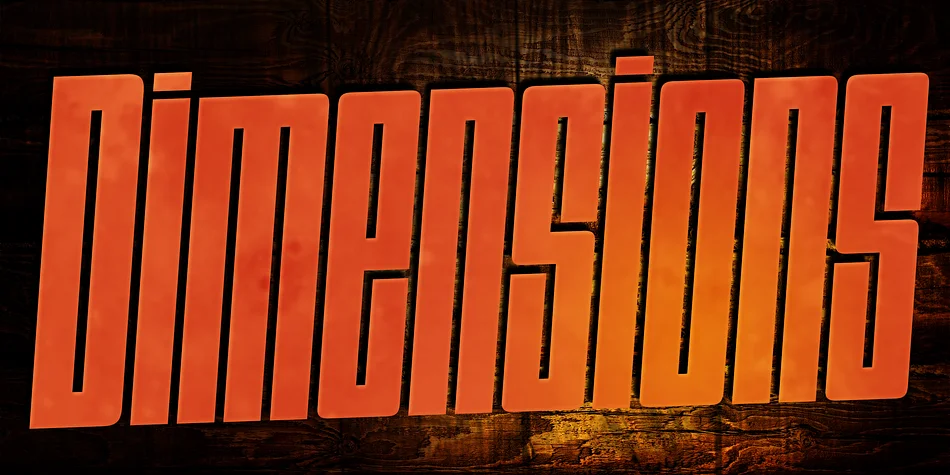
The letterforms push to an extreme, stretching from brutally condensed weights to razor-thin styles that still maintain real visual impact even at modest sizes. Dimensions, designed by Dharma Type, evolved from the beloved Blackout font originally released in 2005, which became a staple among music and fashion brands building distinctive identities. What started as a single typeface in 2011 has since expanded into a full seven-weight family across both Roman and Italic styles, giving designers serious range for dynamic layouts and expressive typographic systems.
This font shines on music album covers where bold visual presence matters, concert posters that need to grab attention from across a room, urban fashion branding that's built on edge, and extreme sports graphics where subtlety just won't cut it. The condensed proportions let you fit substantial letterforms into tight spaces without losing any presence. All weights include uppercase and lowercase characters, accented glyphs, and small capitals accessible through OpenType features (useful for designers working with international text or wanting granular typographic control).
Dimensions works best for creative professionals building identity systems and campaigns that can flex across multiple weights. Get it on Creative Fabrica.
Style & Use Cases
- Overall Style
- Eye-catching, Bold
- Use Case
- Headlines, Logos
- Ideal For
- posters, branding, and social media graphics
- Pairs With
- a readable sans or serif for body
How to Install Dimensions Font
Step-by-step instructions for every platform
- 1Download the Dimensions font file (.ttf or .otf).
- 2Locate the downloaded file in your Downloads folder.
- 3Right-click the font file.
- 4Select "Install" to install for the current user, or "Install for all users" to make it available system-wide.
- 5Dimensions is now available in Word, Photoshop, Illustrator, and all other apps.
More by Dharma Type
View all →

Browse fonts by theme
Curated collections →Saw a font in a picture? Identify any font from an image with our free Font Finder.
More Display Fonts
Browse all →







What pairs well with Dimensions Font?
Dimensions Font is a display font that shines as a display or heading face. Pair it with a clean sans-serif or serif font for body text — the contrast creates a clear hierarchy while the two styles stay balanced and easy to read.




Dimensions Font
by Dharma Type
Reviewed by the FontBoxDL team · Updated September 2026