 Firefox
 1 / 5
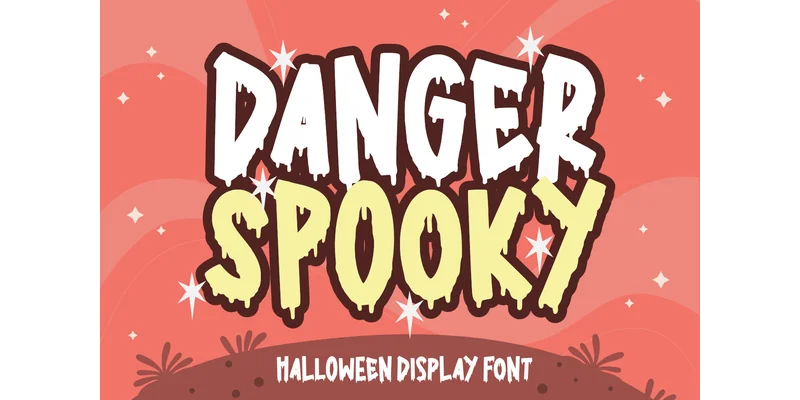
1 / 5About Danger Spooky Font
Danger Spooky earns its visual punch from letterforms that appear to melt and warp across the baseline, their edges pooling and distorting in ways that immediately trigger genuine unease. Typefar designed this display typeface specifically for projects where atmospheric mood carries real weight, and it delivers a distinctly eerie aesthetic without tipping into pure cartoon territory. The font performs particularly well on Halloween party flyers and spooky invitations, embroidered designs for seasonal apparel and tumblers, laser-cut window decals and storefront signage, sublimation prints for mugs and drinkware, and sticker designs for vinyl cutting applications. Designers consistently appreciate how boldly the letterforms read even when scaled small, making it effective for product labels, gift tags, packaging details, and DIY craft projects.
The distorted character set creates a viscerally unsettling mood while staying grounded enough for legitimate production work across multiple mediums. Layering it over Halloween backgrounds, embedding it into embroidery software, or preparing files for sublimation presses all showcase how cleanly the melting effect translates across different production methods and materials. This typeface works best for designers building immersive spooky seasonal campaigns, small-batch Etsy shop owners looking for that specific retro-horror edge, and anyone seeking to inject genuine spine-tingling atmosphere into promotional or holiday decorative projects. Grab Danger Spooky from Creative Fabrica and add this distinctive display font to your collection.
Style & Use Cases
- Overall Style
- Eye-catching, Bold, Barbie
- Use Case
- Headlines, Logos
- Ideal For
- posters, branding, and social media graphics
- Pairs With
- a readable sans or serif for body
How to Install Danger Spooky Font Font
Step-by-step instructions for every platform
- 1Download the Danger Spooky Font font file (.ttf or .otf).
- 2Locate the downloaded file in your Downloads folder.
- 3Right-click the font file.
- 4Select "Install" to install for the current user, or "Install for all users" to make it available system-wide.
- 5Danger Spooky Font is now available in Word, Photoshop, Illustrator, and all other apps.
More by Typefar
View all →
Browse fonts by theme
Curated collections →Saw a font in a picture? Identify any font from an image with our free Font Finder.
More Display Fonts
Browse all →







What pairs well with Danger Spooky Font?
Danger Spooky Font is a display font that shines as a display or heading face. Pair it with a clean sans-serif or serif font for body text — the contrast creates a clear hierarchy while the two styles stay balanced and easy to read.




Danger Spooky Font
by Typefar
Reviewed by the FontBoxDL team · Updated October 2026
One-time purchase