 Firefox
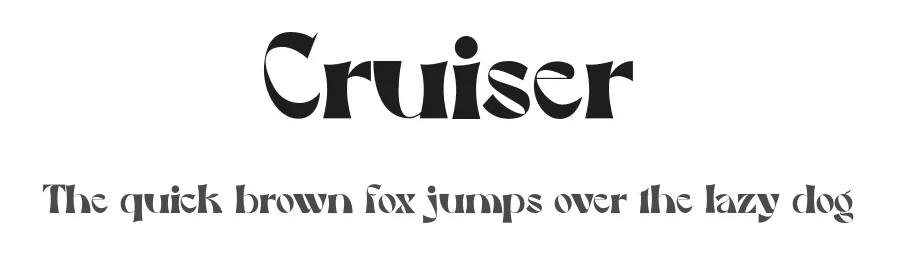 1 / 3
1 / 3Loading font…
About Cruiser Font
Cruiser is a display typeface drawing inspiration from Art Nouveau design principles. Created by Rian dryana, it brings strong ornamental character to projects that benefit from rich historical decorative sensibility. With 219 glyphs and support for 217+ Latin-based languages, the font covers international markets while maintaining its stylistic focus on the Art Nouveau movement's distinctive flowing lines and embellished aesthetic.
This display font shines in contexts where decorative personality genuinely matters: vintage wedding invitations and formal stationery suites, retro brand identity systems and distinctive logo work, ornamental poster design for galleries or cultural institutions, and decorative book covers for heritage or literary publishing projects. At display sizes, its proportions anchor headlines and large-format applications where other typefaces would feel too minimal or generic. The broad language support makes it practical for international design teams working across Western character sets and multiple cultural markets worldwide.
Free for personal use, Cruiser requires a commercial licence sourced directly from the designer if you intend to monetize designs incorporating it. Choose this font when your creative brief specifically calls for Art Nouveau character and genuine historical authenticity, rather than when you need a neutral workhorse typeface for body copy or functional interface design.
Style & Use Cases
- Overall Style
- Eye-catching, Bold, Art Nouveau
- Use Case
- Headlines, Logos
- Ideal For
- posters, branding, and social media graphics
- Pairs With
- a readable sans or serif for body
Cruiser Specifications
| Font Family | Cruiser |
| Style | Regular |
| Full Name | CruiserRegular |
| Version | 1.001 |
| Weight | 400 (Regular) |
| Glyph Count | 219 glyphs |
| PostScript Name | CruiserRegular |
| Designer | Rian dryana |
| Format | OTF (CFF) |
| File Size | 23.6 KB |
Languages Supported
Cruiser supports 217 languages.
How to Install Cruiser Font
Step-by-step instructions for every platform
- 1Download the Cruiser font file (.ttf or .otf).
- 2Locate the downloaded file in your Downloads folder.
- 3Right-click the font file.
- 4Select "Install" to install for the current user, or "Install for all users" to make it available system-wide.
- 5Cruiser is now available in Word, Photoshop, Illustrator, and all other apps.
More by Rian dryana
View all →
Browse fonts by theme
Curated collections →Saw a font in a picture? Identify any font from an image with our free Font Finder.
More Display Fonts
Browse all →







What pairs well with Cruiser Font?
Cruiser Font is a display font that shines as a display or heading face. Pair it with a clean sans-serif or serif font for body text — the contrast creates a clear hierarchy while the two styles stay balanced and easy to read.




Premium Display Fonts
★ PremiumWant something with more weights, glyphs, and commercial polish? These premium display fonts are worth a look.

Cruiser Font
by Rian dryana
Reviewed by the FontBoxDL team · Updated October 2026
License: Free for personal use