 Firefox
 1 / 6
1 / 6About Connectica Font
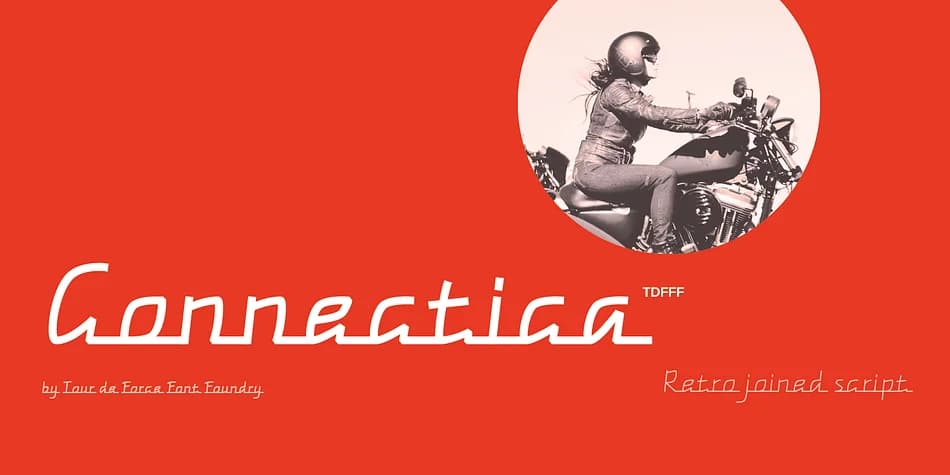
Connectica, from Tour de Force Font Foundry, presents a flowing joined script with consistent line weight throughout. What makes it distinctive is how the connected letterforms maintain evenness without the typical thick-thin variation found in traditional calligraphy fonts. Each letter joins to the next without interruption, though the font includes a clever swash OpenType feature that removes the joining line from initial capitals like E, F, U, V, W, and Y, giving those opening letters a slight flourish when they start a word.
Wedding stationery suites benefit from this typeface's legible elegance, as do Etsy product labels that need hand-drawn charm without sacrificing clarity. Boutique candle and cosmetics packaging is another strong choice, where restraint matters more than ornament. The Light and Regular weights give you flexibility in how bold or delicate you want the overall feel. Beyond these applications, you can deploy it for decorative poster designs, craft vinyl projects, and monogram work where the connected quality adds character while staying readable.
Designers seeking a connected script that doesn't sacrifice clarity will find Connectica suited to a range of professional projects. Grab it from Creative Fabrica to start exploring how these two weights can transform your typographic range and bring a handcrafted feel to your work.
Style & Use Cases
- Overall Style
- Eye-catching, Bold
- Use Case
- Headlines, Logos
- Ideal For
- posters, branding, and social media graphics
- Pairs With
- a readable sans or serif for body
How to Install Connectica Font
Step-by-step instructions for every platform
- 1Download the Connectica font file (.ttf or .otf).
- 2Locate the downloaded file in your Downloads folder.
- 3Right-click the font file.
- 4Select "Install" to install for the current user, or "Install for all users" to make it available system-wide.
- 5Connectica is now available in Word, Photoshop, Illustrator, and all other apps.
More by Tour de Force Font Foundry
View all →
Browse fonts by theme
Curated collections →Saw a font in a picture? Identify any font from an image with our free Font Finder.
More Display Fonts
Browse all →







What pairs well with Connectica Font?
Connectica Font is a display font that shines as a display or heading face. Pair it with a clean sans-serif or serif font for body text — the contrast creates a clear hierarchy while the two styles stay balanced and easy to read.



Connectica Font
Reviewed by the FontBoxDL team · Updated September 2026