 Firefox
 1 / 7
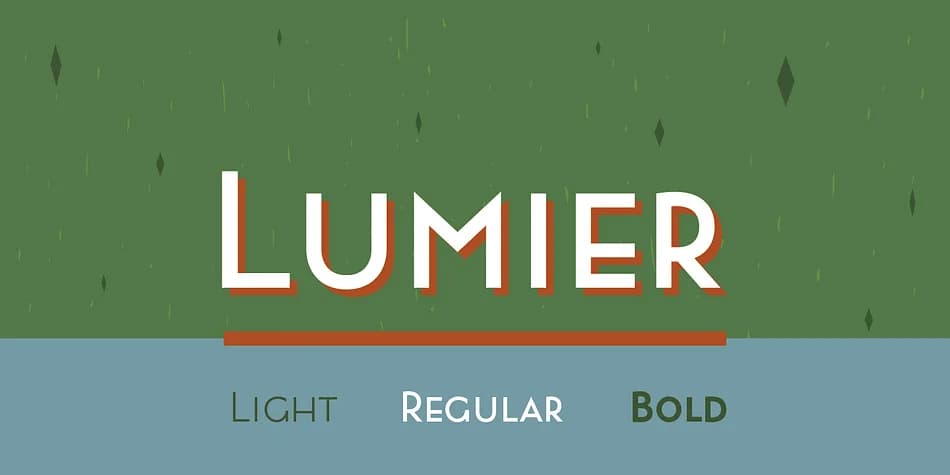
1 / 7About Lumier Font
Picture a 1920s speakeasy entrance where geometric chrome patterns frame the door, or a luxury wine bottle waiting for just the right typeface to catch eyes on a crowded shelf. Lumier, designed by Tour de Force Font Foundry, brings that distinctive art deco sophistication into contemporary work without feeling like pastiche or museum decoration. The typeface channels the bold geometric character of pre-WWII design posters while pulling from the clean proportions of modern sans-serif families, giving it a visual style that nods to the past without getting stuck in it.
You'll find this font perfectly suited to vintage-inspired product packaging, jazz club event posters, retro diner menus, and luxury cosmetics labels, especially when a touch of 1920s attitude genuinely strengthens the overall design. With three weights on offer, you get real flexibility for building contrast and visual hierarchy using a single typeface family rather than layering multiple fonts together. Lumier's geometric character keeps its strength and legibility across different scales, performing equally well as a display headline or in smaller applications. This consistency makes it a reliable choice for designers who want period-appropriate character without compromise.
Download Lumier from Creative Fabrica and add that art deco sensibility to your toolkit.
Style & Use Cases
- Overall Style
- Bold, Distinctive
- Use Case
- Headlines, Posters
- Ideal For
- logos, packaging, and standout titles
- Pairs With
- a neutral sans-serif
How to Install Lumier Font
Step-by-step instructions for every platform
- 1Download the Lumier font file (.ttf or .otf).
- 2Locate the downloaded file in your Downloads folder.
- 3Right-click the font file.
- 4Select "Install" to install for the current user, or "Install for all users" to make it available system-wide.
- 5Lumier is now available in Word, Photoshop, Illustrator, and all other apps.
More by Tour de Force Font Foundry
View all →

Browse fonts by theme
Curated collections →Saw a font in a picture? Identify any font from an image with our free Font Finder.
More Decorative Fonts
Browse all →







What pairs well with Lumier Font?
Lumier Font is a decorative font that shines as a display or heading face. Pair it with a clean sans-serif or serif font for body text — the contrast creates a clear hierarchy while the two styles stay balanced and easy to read.



Lumier Font
Reviewed by the FontBoxDL team · Updated June 2026