 Firefox
 1 / 5
1 / 5About COMEDY WRITER JNL Font
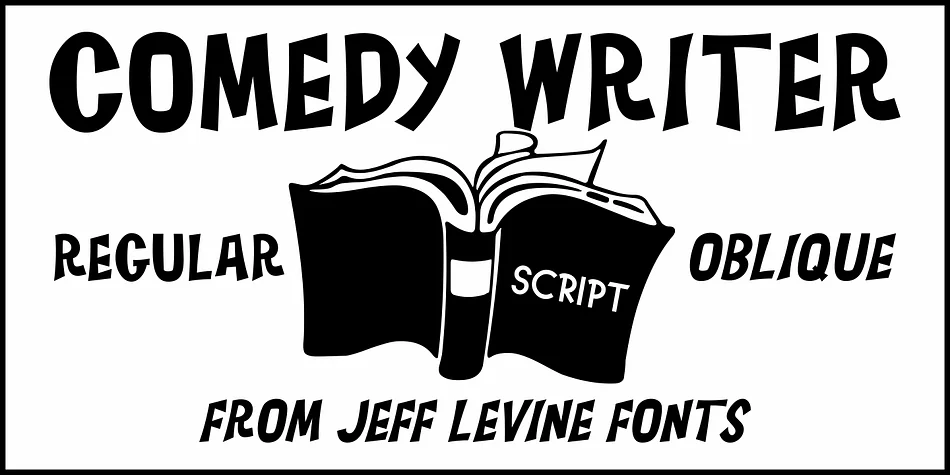
Inspired by the free-form, hand lettered opening title and credits for the classic Dick Van Dyke show, Comedy Writer JNL is available in both regular and oblique versions.
Style & Use Cases
- Overall Style
- Eye-catching, Bold
- Use Case
- Headlines, Logos
- Ideal For
- posters, branding, and social media graphics
- Pairs With
- a readable sans or serif for body
How to Install COMEDY WRITER JNL Font
Step-by-step instructions for every platform
- 1Download the COMEDY WRITER JNL font file (.ttf or .otf).
- 2Locate the downloaded file in your Downloads folder.
- 3Right-click the font file.
- 4Select "Install" to install for the current user, or "Install for all users" to make it available system-wide.
- 5COMEDY WRITER JNL is now available in Word, Photoshop, Illustrator, and all other apps.
More by Jeff Levine Fonts
View all →
Browse fonts by theme
Curated collections →Saw a font in a picture? Identify any font from an image with our free Font Finder.
More Display Fonts
Browse all →







What pairs well with COMEDY WRITER JNL Font?
COMEDY WRITER JNL Font is a display font that shines as a display or heading face. Pair it with a clean sans-serif or serif font for body text — the contrast creates a clear hierarchy while the two styles stay balanced and easy to read.




COMEDY WRITER JNL Font
Reviewed by the FontBoxDL team · Updated April 2026
License: Worry-Free
$29.00