 Firefox
 1 / 4
1 / 4About Clockwork Font
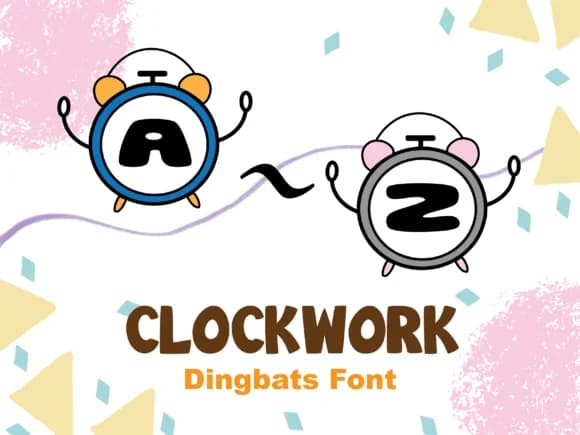
Imagine designing a classroom poster where you need visual elements that read clearly from across the room, or assembling a coloring book spread that kids will find genuinely engaging to work with. Clockwork, created by Happy Bamboo, delivers exactly this through a dingbats collection where letters and shapes live nestled inside small clock faces. That central concept has practical applications across multiple project types: KDP coloring pages and coloring books, print-on-demand merchandise tags, educational classroom materials for teachers, scrapbook layouts, and decorative frame designs for children's rooms or nurseries. Each glyph maintains that balance between playfulness and consistency that makes dingbat sets so useful across different design contexts.
The real strength here is how the geometry functions in practice. These shapes work as standalone decorative elements or as layered background components, adapting to whatever space and layout you're working with. Uniform line weight and circular motifs create visual continuity at any size, letting you pull elements large for strong display impact or small for ornamental spacing within a more complex composition. Clockwork reads with equal clarity in each role. You'll find it ready on Creative Fabrica, where it's waiting to become a reliable workhorse in your decorative font collection.
Style & Use Cases
- Overall Style
- Iconographic, Line Fonts
- Use Case
- Icons, Accents
- Ideal For
- ornaments, bullets, and decorative flourishes
- Pairs With
- any text font
How to Install Clockwork Font
Step-by-step instructions for every platform
- 1Download the Clockwork font file (.ttf or .otf).
- 2Locate the downloaded file in your Downloads folder.
- 3Right-click the font file.
- 4Select "Install" to install for the current user, or "Install for all users" to make it available system-wide.
- 5Clockwork is now available in Word, Photoshop, Illustrator, and all other apps.
More by Happy Bamboo
View all →
Browse fonts by theme
Curated collections →Saw a font in a picture? Identify any font from an image with our free Font Finder.
More Dingbats Fonts
Browse all →







What pairs well with Clockwork Font?
Clockwork Font is a versatile dingbats font that works for both headings and body text. Pair it with a contrasting sans-serif or serif font to add visual interest and a clear distinction between titles and body copy.



Clockwork Font
by Happy Bamboo
Reviewed by the FontBoxDL team · Updated July 2026