 Firefox
 1 / 5
1 / 5About Classic Tales JNL Font
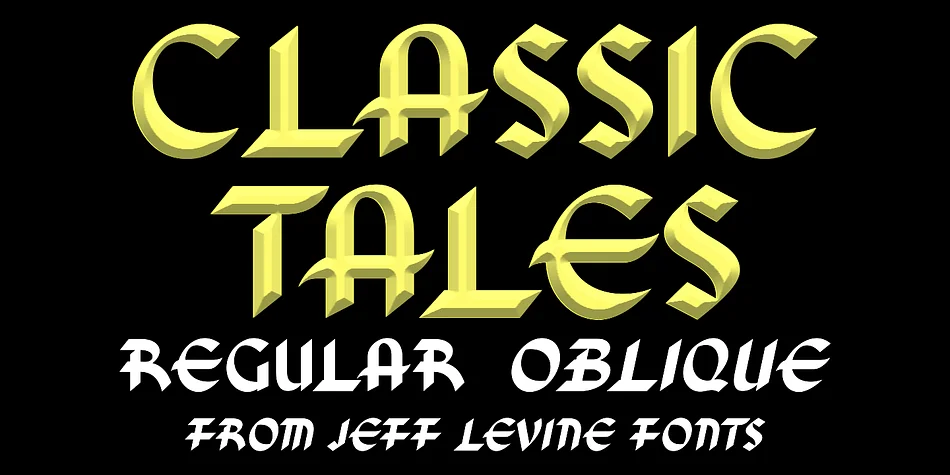
This typeface evokes a refined elegance, bridging yesteryear and today. Classic Tales JNL, designed by Jeff Levine Fonts and inspired by the 1954 "101 Alphabets" collection, is a calligraphic sans serif that feels both rooted in historic letterforms and refreshingly contemporary.
The typeface shines whenever sophistication meets genuine visual personality. Wedding invitation suites gain real character from its refined stroke work and subtle details, while vintage-style branding projects and boutique restaurant menus benefit from its distinctive personality without sacrificing readability. Craft labels, book cover titles, greeting card designs, and small-run product packaging all draw polish from its dual nature: ornate yet controlled. Both regular and oblique versions are included, giving designers the flexibility they need for layouts that call for movement alongside those requiring formal structure. That versatility extends to event programs, certificate designs, and even editorial headers where historical resonance matters.
Pair Classic Tales JNL with a crisp, minimal sans-serif for body copy to create genuine contrast and let the display lettering breathe. It's a thoughtful choice for designers seeking historic depth without reaching for typical script fonts. Download it from Creative Fabrica and explore how classic influences can bring life to contemporary design work.
Style & Use Cases
- Overall Style
- Eye-catching, Bold
- Use Case
- Headlines, Logos
- Ideal For
- posters, branding, and social media graphics
- Pairs With
- a readable sans or serif for body
How to Install Classic Tales JNL Font
Step-by-step instructions for every platform
- 1Download the Classic Tales JNL font file (.ttf or .otf).
- 2Locate the downloaded file in your Downloads folder.
- 3Right-click the font file.
- 4Select "Install" to install for the current user, or "Install for all users" to make it available system-wide.
- 5Classic Tales JNL is now available in Word, Photoshop, Illustrator, and all other apps.
More by Jeff Levine Fonts
View all →



Browse fonts by theme
Curated collections →Saw a font in a picture? Identify any font from an image with our free Font Finder.
More Display Fonts
Browse all →







What pairs well with Classic Tales JNL Font?
Classic Tales JNL Font is a display font that shines as a display or heading face. Pair it with a clean sans-serif or serif font for body text — the contrast creates a clear hierarchy while the two styles stay balanced and easy to read.




Classic Tales JNL Font
Reviewed by the FontBoxDL team · Updated June 2026