 Firefox
 1 / 5
1 / 5About Candy Counter JNL Font
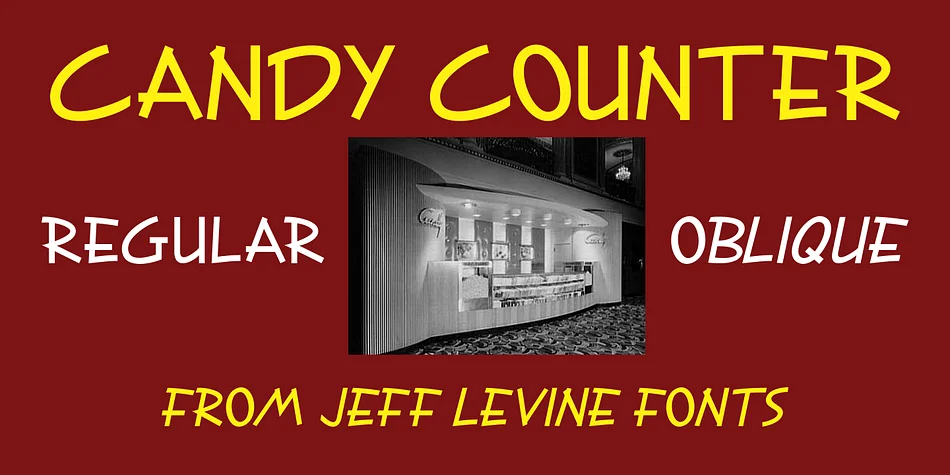
This casual sans serif carries the warmth of hand lettering from the golden age of Hollywood. Candy Counter JNL, created by Jeff Levine Fonts, draws its personality from a 1939 advertisement penned for Republic Pictures in a trade publication. The letterforms retain that loose, approachable character that made mid-century signage so engaging and inviting to passersby. Every curve and corner reflects the ease of brushwork and the confidence of a type designer who understood what makes friendly letterforms stick in people's minds. There's nothing rigid or overly geometric here. Work with it on a single headline or build an entire design system around its relaxed personality.
The font shines in projects that need vintage charm without veering into kitsch territory. Try it for retro diner menus, vinyl record sleeve layouts, handmade candy packaging labels, or theatrical poster designs. Available in both regular and oblique versions, it gives you flexibility to add emphasis or create visual interest in your compositions. Graphic designers working on period-authentic branding campaigns will find the type responds beautifully across applications. It works equally well in formal layouts or something deliberately casual and sketch-like.
Candy Counter JNL suits anyone celebrating mid-century character in their design work. Get it on Creative Fabrica.
Style & Use Cases
- Overall Style
- Eye-catching, Bold
- Use Case
- Headlines, Logos
- Ideal For
- posters, branding, and social media graphics
- Pairs With
- a readable sans or serif for body
How to Install Candy Counter JNL Font
Step-by-step instructions for every platform
- 1Download the Candy Counter JNL font file (.ttf or .otf).
- 2Locate the downloaded file in your Downloads folder.
- 3Right-click the font file.
- 4Select "Install" to install for the current user, or "Install for all users" to make it available system-wide.
- 5Candy Counter JNL is now available in Word, Photoshop, Illustrator, and all other apps.
More by Jeff Levine Fonts
View all →
Browse fonts by theme
Curated collections →Saw a font in a picture? Identify any font from an image with our free Font Finder.
More Display Fonts
Browse all →







What pairs well with Candy Counter JNL Font?
Candy Counter JNL Font is a display font that shines as a display or heading face. Pair it with a clean sans-serif or serif font for body text — the contrast creates a clear hierarchy while the two styles stay balanced and easy to read.




Candy Counter JNL Font
Reviewed by the FontBoxDL team · Updated June 2026