 Firefox
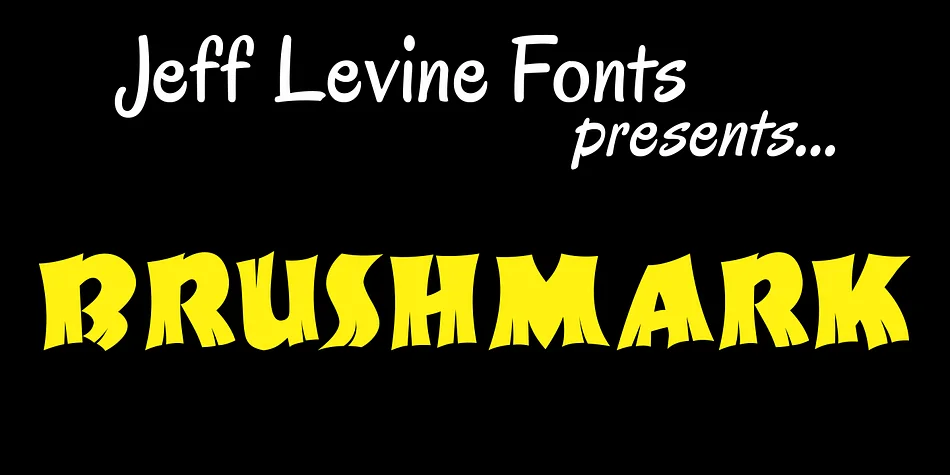
About BRUSHMARK JNL Font
You can feel the Speedball pen in every stroke of this typeface. BRUSHMARK JNL, from Jeff Levine Fonts, draws directly from a 1940s instruction book, capturing that authentic marker-pen quality with all its slightly irregular charm and organic flow. The hand-drawn character has real warmth, which is why it works so well for any project needing personality and visual interest.
Display typography like this shines wherever character matters more than polish. Retro adventure labels benefit from its energy, as do vintage travel ephemera and tiki lounge menus where that hand-drawn quality feels essential. Botanical illustration captions, tropical and jungle-themed work, vintage poster design, and mid-century resort branding all lean into its nostalgic strength. Its strokes have enough presence to command attention on packaging or standalone signage, yet stay readable on smaller pieces like stickers and stationery without losing impact.
Pair it with a neutral sans like Helvetica Neue when you need body text or supporting callouts. The contrast between its expressive letterforms and minimal sans keeps layouts from feeling cluttered. Grab BRUSHMARK JNL from Creative Fabrica and let it bring authentic retro character to your next design.
Style & Use Cases
- Overall Style
- Eye-catching, Bold
- Use Case
- Headlines, Logos
- Ideal For
- posters, branding, and social media graphics
- Pairs With
- a readable sans or serif for body
How to Install BRUSHMARK JNL Font
Step-by-step instructions for every platform
- 1Download the BRUSHMARK JNL font file (.ttf or .otf).
- 2Locate the downloaded file in your Downloads folder.
- 3Right-click the font file.
- 4Select "Install" to install for the current user, or "Install for all users" to make it available system-wide.
- 5BRUSHMARK JNL is now available in Word, Photoshop, Illustrator, and all other apps.
More by Jeff Levine Fonts
View all →



Browse fonts by theme
Curated collections →Saw a font in a picture? Identify any font from an image with our free Font Finder.
More Display Fonts
Browse all →







What pairs well with BRUSHMARK JNL Font?
BRUSHMARK JNL Font is a display font that shines as a display or heading face. Pair it with a clean sans-serif or serif font for body text — the contrast creates a clear hierarchy while the two styles stay balanced and easy to read.




BRUSHMARK JNL Font
Reviewed by the FontBoxDL team · Updated September 2026