 Firefox
About BROOKSIDE JNL Font
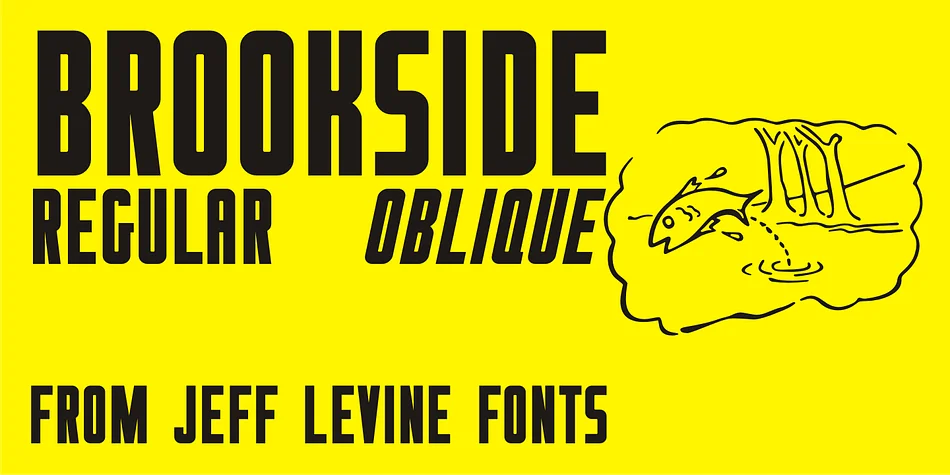
There's a brassy, nostalgic energy to this typeface that feels distinctly Jazz Age. Brookside JNL, designed by Jeff Levine Fonts, draws its character from the bold lettering used on 1920s sheet music, capturing that decade's appetite for snappy, attention-grabbing typography that never wastes a single stroke.
The font is a condensed sans-serif with real personality, available in both regular and oblique versions for different applications. It shines on speakeasy menu cards, jazz festival posters, retro vinyl record sleeves, and vintage nightclub invitations. The letterforms carry that deliberate punch you'd expect from an era when every character had to earn its space, whether squeezed into a tight banner or sprawling across a cover. This is design with genuine purpose, where form and function sit shoulder to shoulder with no wasted movement. The condensed proportions give the whole thing a sense of speed and urgency, a feeling that something exciting is about to jump off the page. It's the kind of typeface that knows how to make an entrance.
Pair Brookside JNL with a clean, neutral sans-serif for body text, letting this display type command attention while the pairing keeps things balanced and readable. The contrast will strengthen both voices. You can grab it on Creative Fabrica and start building designs with some real vintage character.
Style & Use Cases
- Overall Style
- Eye-catching, Bold
- Use Case
- Headlines, Logos
- Ideal For
- posters, branding, and social media graphics
- Pairs With
- a readable sans or serif for body
How to Install BROOKSIDE JNL Font
Step-by-step instructions for every platform
- 1Download the BROOKSIDE JNL font file (.ttf or .otf).
- 2Locate the downloaded file in your Downloads folder.
- 3Right-click the font file.
- 4Select "Install" to install for the current user, or "Install for all users" to make it available system-wide.
- 5BROOKSIDE JNL is now available in Word, Photoshop, Illustrator, and all other apps.
More by Jeff Levine Fonts
View all →



Browse fonts by theme
Curated collections →Saw a font in a picture? Identify any font from an image with our free Font Finder.
More Display Fonts
Browse all →







What pairs well with BROOKSIDE JNL Font?
BROOKSIDE JNL Font is a display font that shines as a display or heading face. Pair it with a clean sans-serif or serif font for body text — the contrast creates a clear hierarchy while the two styles stay balanced and easy to read.




BROOKSIDE JNL Font
Reviewed by the FontBoxDL team · Updated September 2026