 Firefox
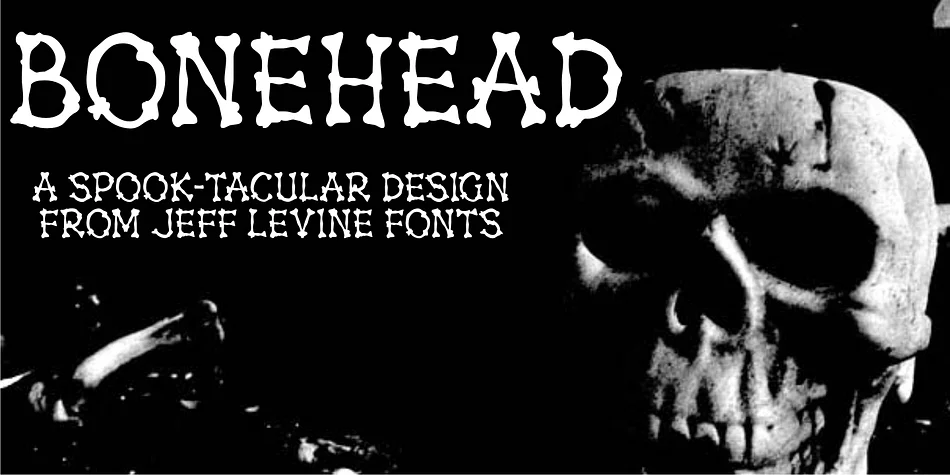
About BONEHEAD JNL Font
BONEHEAD JNL, created by Jeff Levine Fonts, is a display typeface where every single character is literally constructed from actual bones. The skeletal letterforms deliver instant visual identity and make it impossible for designs to fade into the background, giving any layout an immediately themed, macabre energy that works perfectly when you need atmosphere with genuine edge and personality.
This font belongs on projects where conventional typefaces miss the mark completely. Haunted house signage gets real menace from bone-built letters, while horror movie posters and pirate-themed merchandise gain their "danger ahead" vibe without needing extra graphics to land the theme. Halloween party invitations carry mood and personality from the letterforms alone. Spooky greeting cards, costume shop labels, game packaging for dark horror titles, and band artwork for macabre genres all thrive when letterforms refuse to settle for neutral design spaces. The straightforward skeletal construction remains legible across sizes and applications, delivering impact in tight layouts and large-scale installations alike.
BONEHEAD JNL serves designers tackling novelty and themed projects where unconventional visual language actually strengthens the message. Find it on Creative Fabrica when you need letterforms that bring instant context to designs pushing beyond the everyday.
Style & Use Cases
- Overall Style
- Eye-catching, Bold
- Use Case
- Headlines, Logos
- Ideal For
- posters, branding, and social media graphics
- Pairs With
- a readable sans or serif for body
How to Install BONEHEAD JNL Font
Step-by-step instructions for every platform
- 1Download the BONEHEAD JNL font file (.ttf or .otf).
- 2Locate the downloaded file in your Downloads folder.
- 3Right-click the font file.
- 4Select "Install" to install for the current user, or "Install for all users" to make it available system-wide.
- 5BONEHEAD JNL is now available in Word, Photoshop, Illustrator, and all other apps.
More by Jeff Levine Fonts
View all →



Browse fonts by theme
Curated collections →Saw a font in a picture? Identify any font from an image with our free Font Finder.
More Display Fonts
Browse all →







What pairs well with BONEHEAD JNL Font?
BONEHEAD JNL Font is a display font that shines as a display or heading face. Pair it with a clean sans-serif or serif font for body text — the contrast creates a clear hierarchy while the two styles stay balanced and easy to read.




BONEHEAD JNL Font
Reviewed by the FontBoxDL team · Updated September 2026