 Firefox
 1 / 10
About Blunt Font
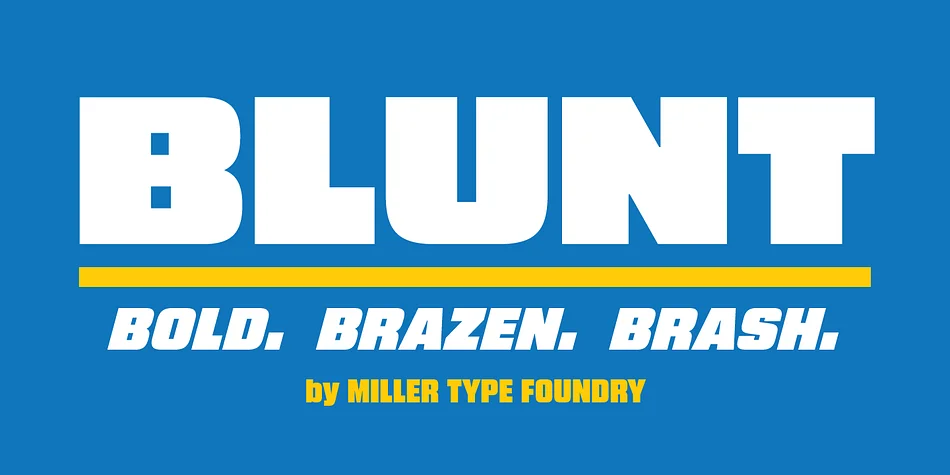
Blunt by Miller Type Foundry is a bold display typeface designed to step beyond worn-out alternatives like Impact. When your headline needs real punch without sounding recycled, this is what you reach for.
The four weights, Condensed through Wide, each with matching italics, deliver flexibility that single-weight fonts cannot touch. Magazine mastheads, music event posters, indie beauty packaging, wedding invitation suites, and social media graphics for small brands all find their place within this range. The condensed versions sit tight and aggressive, perfect for impact and density. Wide settings expand to claim space with confidence. You're working with one typeface but accessing four distinct personalities, each ready for different contexts and energy levels. Technical depth lives alongside practical simplicity.
What separates Blunt from the crowd is restraint. There's no ornamentation working overtime to grab attention, no unnecessary decorative elements piled on for impact. Just strong, honest letterforms built to do what display fonts should do. The heaviness emerges from structure itself, not tricks or embellishment. Find Blunt on Creative Fabrica and see how carefully engineered simplicity can carry the full weight of what you're trying to communicate.
Style & Use Cases
- Overall Style
- Eye-catching, Bold
- Use Case
- Headlines, Logos
- Ideal For
- posters, branding, and social media graphics
- Pairs With
- a readable sans or serif for body
How to Install Blunt Font
Step-by-step instructions for every platform
- 1Download the Blunt font file (.ttf or .otf).
- 2Locate the downloaded file in your Downloads folder.
- 3Right-click the font file.
- 4Select "Install" to install for the current user, or "Install for all users" to make it available system-wide.
- 5Blunt is now available in Word, Photoshop, Illustrator, and all other apps.
More by Miller Type Foundry
View all →
Browse fonts by theme
Curated collections →Saw a font in a picture? Identify any font from an image with our free Font Finder.
More Display Fonts
Browse all →







What pairs well with Blunt Font?
Blunt Font is a display font that shines as a display or heading face. Pair it with a clean sans-serif or serif font for body text — the contrast creates a clear hierarchy while the two styles stay balanced and easy to read.




Blunt Font
Reviewed by the FontBoxDL team · Updated September 2026