 Firefox
 1 / 7
1 / 7About Blink Font
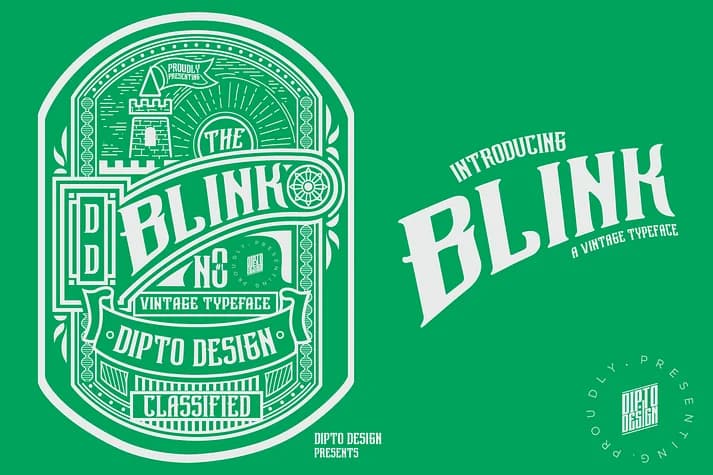
There's a nostalgic, slightly retro warmth to this typeface that draws you in immediately. Blink, created by Dipto Design, is a display typeface that bridges vintage charm with contemporary sensibilities. Each letterform carries that unmistakable mid-century character (the kind you find in old storefront signage or hand-lettered book covers) without drifting into pure period piece territory or feeling like costume lettering.
The practical applications here are strong: vintage wedding invitation suites, retro labels for artisanal packaging, theatrical and event posters, and gallery opening cards all benefit from what Blink brings to the table. You get a full character set with uppercase, lowercase, punctuation, marks, and symbols, plus a stylistic set for added flexibility. That means you can layer in supporting text or callouts without reaching for a second typeface, though you'll probably want one for body copy anyway.
Pair Blink with a clean, minimal sans-serif for extended reading and you've built something that feels coherent. The combination of personality in the display layer and restraint in supporting text is where real sophistication lives. Get it on Creative Fabrica in .otf, .ttf, and .woff formats.
Style & Use Cases
- Overall Style
- Eye-catching, Bold
- Use Case
- Headlines, Logos
- Ideal For
- posters, branding, and social media graphics
- Pairs With
- a readable sans or serif for body
How to Install Blink Font
Step-by-step instructions for every platform
- 1Download the Blink font file (.ttf or .otf).
- 2Locate the downloaded file in your Downloads folder.
- 3Right-click the font file.
- 4Select "Install" to install for the current user, or "Install for all users" to make it available system-wide.
- 5Blink is now available in Word, Photoshop, Illustrator, and all other apps.
More by Dipto Design
View all →

Browse fonts by theme
Curated collections →Saw a font in a picture? Identify any font from an image with our free Font Finder.
More Display Fonts
Browse all →







What pairs well with Blink Font?
Blink Font is a display font that shines as a display or heading face. Pair it with a clean sans-serif or serif font for body text — the contrast creates a clear hierarchy while the two styles stay balanced and easy to read.



Blink Font
by Dipto Design
Reviewed by the FontBoxDL team · Updated September 2026