
 1 / 8
1 / 8About Black Rose Font
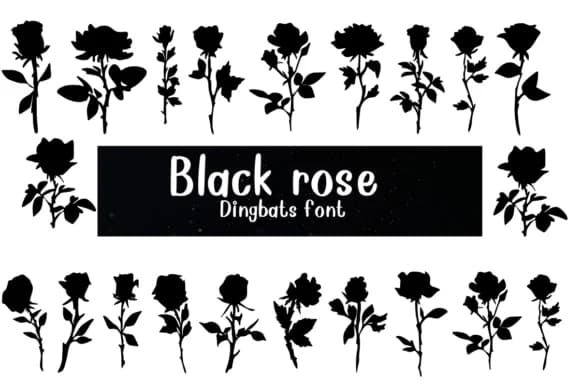
Black Rose by Nongyao is a dingbat font built entirely from rose silhouettes, offering a refreshing take on decorative type. Rather than traditional characters, each keystroke produces a distinct floral form, all rendered in solid black. The multiple weight variations let you adjust how bold or delicate your compositions feel.
Wedding invitation suites benefit from its ornamental flourishes, letting you add botanical elegance without traditional lettering. Cosmetic and skincare packaging comes alive when the roses layer as borders or scattered accents across labels and boxes. Coloring pages and printable art projects work well with the outline structure, since you can add your own palette to each form. For greeting card design, the collection delivers layered floral backgrounds and handcrafted-feeling patterns that templated solutions can't match.
Delivered in both OTF and TTF formats with strong language support, it works across Procreate, Affinity Designer, Affinity Photo, and most design software without compatibility issues. The character set includes a genuine variety of rose poses and petal arrangements, so you're not repeating the same form each time. For botanical illustrations, packaging design, branding work, or print collateral that needs a floral touch, Black Rose provides the kind of versatility that working designers appreciate. Download Black Rose from Creative Fabrica and add this collection to your toolkit.
Style & Use Cases
- Overall Style
- Iconographic, Fonts
- Use Case
- Icons, Accents
- Ideal For
- ornaments, bullets, and decorative flourishes
- Pairs With
- any text font
How to Install Black Rose Font
Step-by-step instructions for every platform
- 1Download the Black Rose font file (.ttf or .otf).
- 2Locate the downloaded file in your Downloads folder.
- 3Right-click the font file.
- 4Select "Install" to install for the current user, or "Install for all users" to make it available system-wide.
- 5Black Rose is now available in Word, Photoshop, Illustrator, and all other apps.


More Dingbats Fonts
Browse all →







What pairs well with Black Rose Font?
Black Rose Font is a versatile dingbats font that works for both headings and body text. Pair it with a contrasting sans-serif or serif font to add visual interest and a clear distinction between titles and body copy.



Black Rose Font
by Nongyao
Reviewed by the FontBoxDL team · Updated August 2026