
 1 / 8
1 / 8About Banana Dancing Font
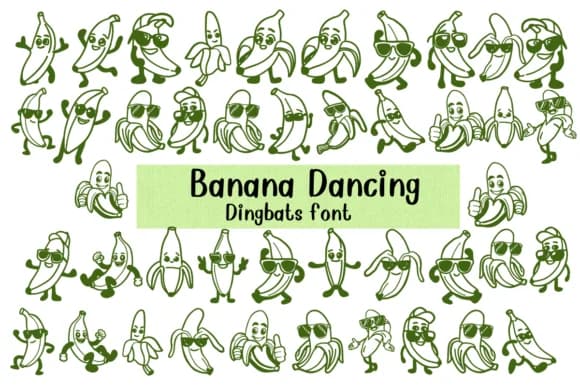
You're laying out a children's birthday invitation and need something that makes kids laugh and actually take notice. Banana Dancing from Nongyao is a dingbats font built entirely from animated banana characters, replacing every letter and numeral with playful fruit personalities striking different poses. These aren't flat, static illustrations: they're expressive characters that convey movement and humor through physical gesture alone, which is precisely what makes dingbats actually useful in design.
The font shines in sticker sheets, DIY scrapbooking layouts, and coloring book pages where each character needs to function both as typographic glue and as a standalone illustration on its own. Nursery wall art, greeting cards aimed at young children, and cartoon animation projects all tap into the outline-style design Nongyao crafted. The doodle quality keeps things youthful without veering into saccharine territory, and characters maintain crisp, readable detail even when enlarged significantly for posters or printed collateral. You can layer them, overlap them, or use them as repeating background patterns in layouts.
Available in both OTF and TTF formats, Banana Dancing integrates smoothly with Procreate, Affinity Designer, and most standard design software. Pick it up on Creative Fabrica and watch how much personality a dancing banana can inject into otherwise straightforward compositions.
Style & Use Cases
- Overall Style
- Iconographic, Fonts
- Use Case
- Icons, Accents
- Ideal For
- ornaments, bullets, and decorative flourishes
- Pairs With
- any text font
How to Install Banana Dancing Font
Step-by-step instructions for every platform
- 1Download the Banana Dancing font file (.ttf or .otf).
- 2Locate the downloaded file in your Downloads folder.
- 3Right-click the font file.
- 4Select "Install" to install for the current user, or "Install for all users" to make it available system-wide.
- 5Banana Dancing is now available in Word, Photoshop, Illustrator, and all other apps.


More Dingbats Fonts
Browse all →







What pairs well with Banana Dancing Font?
Banana Dancing Font is a versatile dingbats font that works for both headings and body text. Pair it with a contrasting sans-serif or serif font to add visual interest and a clear distinction between titles and body copy.



Banana Dancing Font
by Nongyao
Reviewed by the FontBoxDL team · Updated August 2026