 Firefox
 1 / 10
About Balium Font
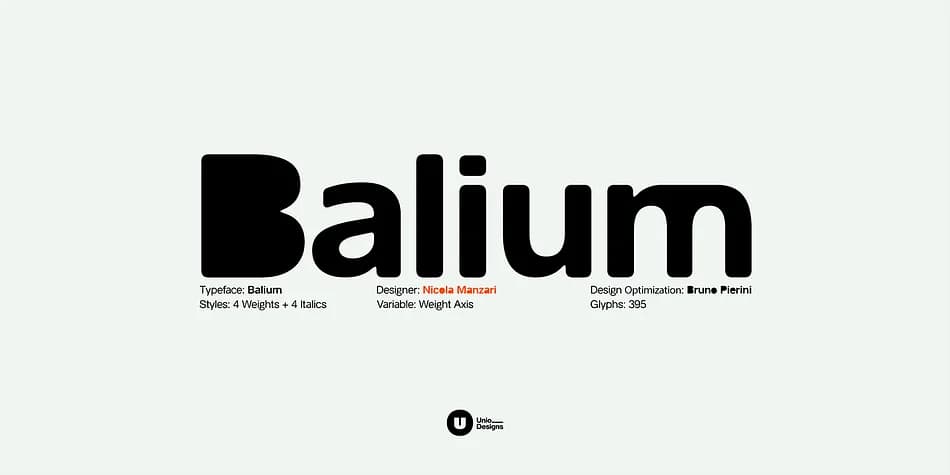
Balium by Unio Creative Solutions is a contemporary sans-serif display typeface that makes imperfection deliberately structural. Rather than refining forms through traditional subtraction, this typeface builds character through strategic accumulation: areas that would normally demand stroke thinning are instead saturated with black, creating an irregularly expressive rhythm between solidity and calculated distortion. The result is a typeface that feels intentional and slightly off, operating at odds with the algorithmic precision that dominates so much contemporary design.
The family spans Roman to Extra Bold through continuous, proportionally stable interpolation, with every weight accompanied by a matching oblique. Core, Filled, Bad Kerning, and Bad Kerning Filled styles give you layering options depending on how much visual friction you want to introduce to a design. This works equally well commanding attention across magazine cover headlines, anchoring experimental poster work, powering tech startup interfaces, or defining a creative agency's visual identity with something genuinely unconventional.
With 447 glyphs supporting a broad range of languages, Balium delivers real flexibility across applications without losing its singular visual voice. If you're drawn to a typeface that treats imperfection as structural strength rather than something to hide, grab Balium on Creative Fabrica.
Style & Use Cases
- Overall Style
- Eye-catching, Bold
- Use Case
- Headlines, Logos
- Ideal For
- posters, branding, and social media graphics
- Pairs With
- a readable sans or serif for body
How to Install Balium Font
Step-by-step instructions for every platform
- 1Download the Balium font file (.ttf or .otf).
- 2Locate the downloaded file in your Downloads folder.
- 3Right-click the font file.
- 4Select "Install" to install for the current user, or "Install for all users" to make it available system-wide.
- 5Balium is now available in Word, Photoshop, Illustrator, and all other apps.
More by Unio Creative Solutions
View all →
Browse fonts by theme
Curated collections →Saw a font in a picture? Identify any font from an image with our free Font Finder.
More Display Fonts
Browse all →







What pairs well with Balium Font?
Balium Font is a display font that shines as a display or heading face. Pair it with a clean sans-serif or serif font for body text — the contrast creates a clear hierarchy while the two styles stay balanced and easy to read.



Balium Font
Reviewed by the FontBoxDL team · Updated September 2026