 Firefox
 1 / 5
1 / 5About Asperia Maestro Font
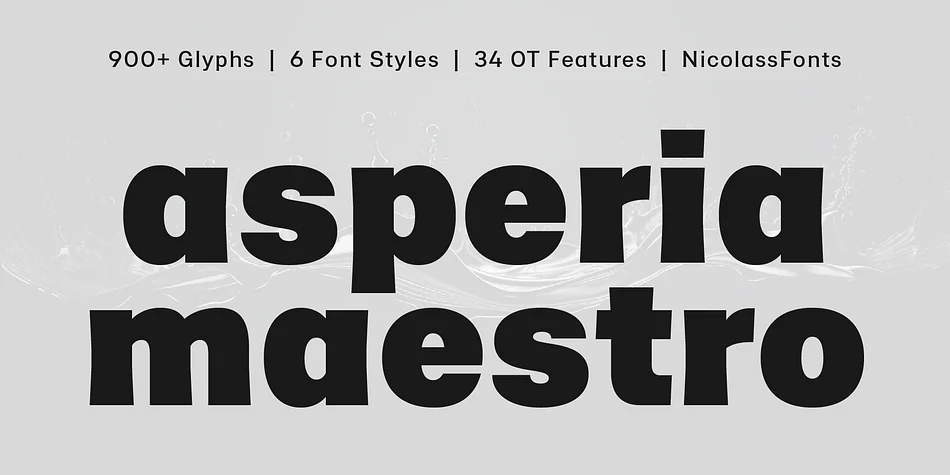
Imagine scrolling through a luxury skincare brand's website and pausing on elegant typography that feels both modern and inviting. That's Asperia Maestro, designed by NicolassFonts, a contemporary typeface family that deepens the sharp geometric foundation of the original Asperia with warmer, more flowing letterforms. Softer curves and refined details create a personality that's approachable without sacrificing sophistication.
This typeface excels across magazine spreads, upscale product packaging, jewelry brand identities, and high-end editorial layouts where visual clarity pairs with refined aesthetics. Web headers on creative agency portfolios and logo suites in luxury sectors all benefit from its balanced proportions and even rhythm. Spanning three weights with matching italics, the family includes over 900 glyphs plus comprehensive OpenType features. Those extras mean you get access to ligatures, stylistic alternates, and fine typographic controls that let you shape the type to fit your specific project demands.
Asperia Maestro handles both display and text roles with equal poise, working beautifully when set large while staying legible at smaller sizes. Its human warmth and technical depth make it particularly useful for designers building distinctive brand systems where personality and precision both matter. You'll find Asperia Maestro on Creative Fabrica, ready to add refinement to your next design challenge.
Style & Use Cases
- Overall Style
- Eye-catching, Bold
- Use Case
- Headlines, Logos
- Ideal For
- posters, branding, and social media graphics
- Pairs With
- a readable sans or serif for body
How to Install Asperia Maestro Font
Step-by-step instructions for every platform
- 1Download the Asperia Maestro font file (.ttf or .otf).
- 2Locate the downloaded file in your Downloads folder.
- 3Right-click the font file.
- 4Select "Install" to install for the current user, or "Install for all users" to make it available system-wide.
- 5Asperia Maestro is now available in Word, Photoshop, Illustrator, and all other apps.
More by NicolassFonts
View all →
Browse fonts by theme
Curated collections →Saw a font in a picture? Identify any font from an image with our free Font Finder.
More Display Fonts
Browse all →







What pairs well with Asperia Maestro Font?
Asperia Maestro Font is a display font that shines as a display or heading face. Pair it with a clean sans-serif or serif font for body text — the contrast creates a clear hierarchy while the two styles stay balanced and easy to read.




Asperia Maestro Font
Reviewed by the FontBoxDL team · Updated September 2026