
 1 / 7
1 / 7About Artonic Font
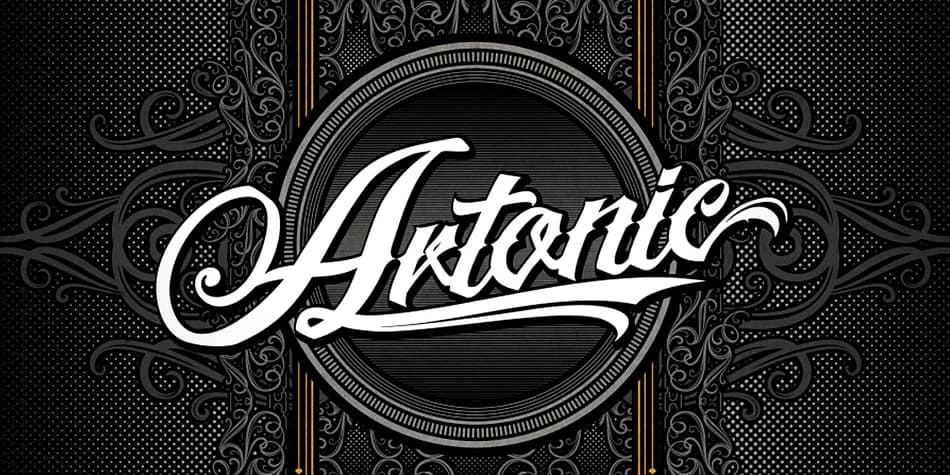
Artonic by Seventh Imperium is a tattoo script that brings urban edge and flowing elegance into one cohesive typeface. Built expressly for needle work and bold design layouts, it captures the precision of hand-drawn letterforms while maintaining the structural confidence that allows a typeface to hold its own at any scale. The real distinction lies in the balance between fluid motion and sharp execution: curves that move with clear intent, serifs that cut clean, lines that hold their weight without wavering.
This script thrives on band logos and motorcycle club patches where visual attitude matters as much as readability. It handles musician identity packages, music venue posters, and streetwear labels with equal ease, each application benefiting from the way it communicates edge without sacrificing sophistication. Independent record shops, urban fashion brands, and tattoo parlor signage are natural homes for this typeface at both display and text-dense scales.
The typeface includes ligatures and OpenType alternates, so you can customize letterforms and introduce natural rhythm into longer text passages. If you want a script rooted in genuine tattoo shop aesthetics rather than something that just imitates the look, Artonic deserves a spot in your font library and is worth grabbing from Creative Fabrica.
Style & Use Cases
- Overall Style
- Elegant, Flowing
- Use Case
- Invitations, Branding
- Ideal For
- wedding stationery, greeting cards, and signatures
- Pairs With
- a simple uppercase sans
How to Install Artonic Font
Step-by-step instructions for every platform
- 1Download the Artonic font file (.ttf or .otf).
- 2Locate the downloaded file in your Downloads folder.
- 3Right-click the font file.
- 4Select "Install" to install for the current user, or "Install for all users" to make it available system-wide.
- 5Artonic is now available in Word, Photoshop, Illustrator, and all other apps.
More by Seventh Imperium
View all →
More Script Handwritten Fonts
Browse all →







What pairs well with Artonic Font?
Artonic Font is a script font that shines as a display or heading face. Pair it with a clean sans-serif or serif font for body text — the contrast creates a clear hierarchy while the two styles stay balanced and easy to read.



Artonic Font
Reviewed by the FontBoxDL team · Updated July 2026