 Firefox
 1 / 6
1 / 6About Lunair Font
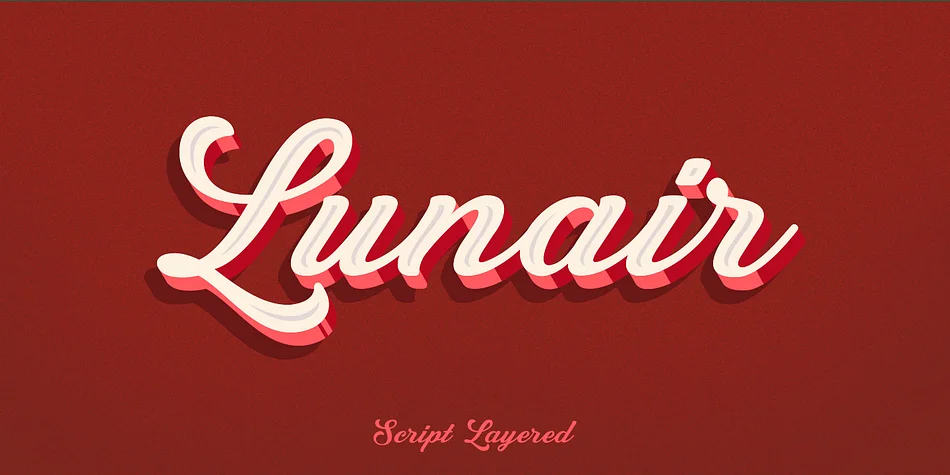
This font radiates contemporary elegance with dimensional depth that naturally catches the eye. Lunair, created by Seventh Imperium, is a modern layered script typeface built specifically for designs that demand genuine visual sophistication, polish, and refined presence.
The real power comes from its layering architecture and design flexibility. You start with the base script layer and build on it by adding extrude and shadow options, combining them in different ways to create genuine three-dimensional effects that feel intentional and polished, not gimmicky or overwrought. You get standalone script, base, emboss, and inline versions that you can mix and match according to your design needs, offering real flexibility without unnecessary bloat. It performs beautifully for luxury wedding invitation suites, high-end beauty and skincare packaging, personalized greeting card designs, and decorative social media graphics for boutique creative brands. This dimensional construction creates subtle visual depth that draws immediate attention in both print and digital contexts, without feeling dated or reliant on fleeting trends.
To keep the focus on Lunair's dimensional letterforms and distinctive personality, pair it with a clean, minimal sans-serif typeface such as Helvetica or Inter. Find it on Creative Fabrica and bring sophisticated layered script to your next creative project.
Style & Use Cases
- Overall Style
- Elegant, Flowing
- Use Case
- Invitations, Branding
- Ideal For
- wedding stationery, greeting cards, and signatures
- Pairs With
- a simple uppercase sans
How to Install Lunair Font
Step-by-step instructions for every platform
- 1Download the Lunair font file (.ttf or .otf).
- 2Locate the downloaded file in your Downloads folder.
- 3Right-click the font file.
- 4Select "Install" to install for the current user, or "Install for all users" to make it available system-wide.
- 5Lunair is now available in Word, Photoshop, Illustrator, and all other apps.
More by Seventh Imperium
View all →
Browse fonts by theme
Curated collections →Saw a font in a picture? Identify any font from an image with our free Font Finder.
More Script Handwritten Fonts
Browse all →







What pairs well with Lunair Font?
Lunair Font is a script font that shines as a display or heading face. Pair it with a clean sans-serif or serif font for body text — the contrast creates a clear hierarchy while the two styles stay balanced and easy to read.




Lunair Font
Reviewed by the FontBoxDL team · Updated July 2026