 Firefox
 1 / 5
1 / 5About ART MATERIALS JNL Font
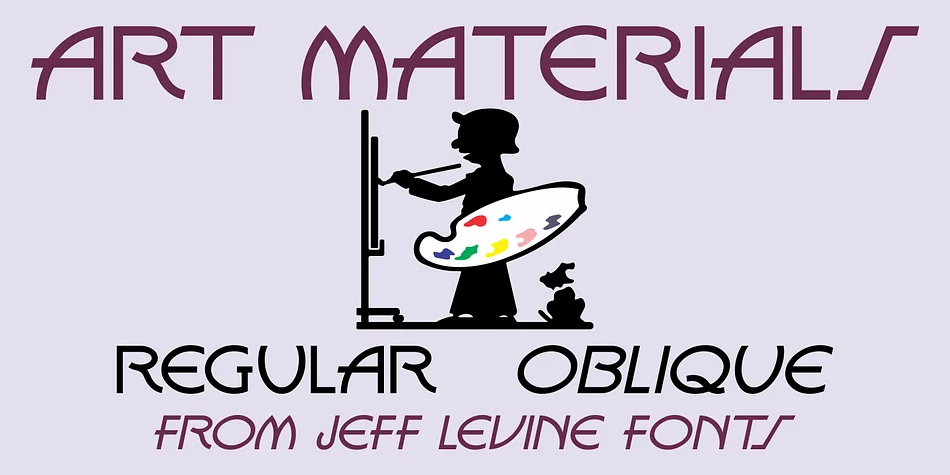
The letterforms radiate geometric precision and rhythmic elegance, hallmarks of authentic Art Deco design. ART MATERIALS JNL, created by Jeff Levine Fonts, traces its origins to a 1930s cover of Ernst H. Friedrichs, Inc.'s comprehensive catalog, where "Artists' Materials" was hand-lettered in a stylized sans serif with real personality. The digital font captures that era's optimism and technical clarity, with sharp angles and confident proportions that feel as fresh today as they did nearly a century ago.
This display typeface shines when applied to vintage-inspired product labels, retro concert posters, boutique gallery invitations, and carefully crafted packaging for small businesses that value personality and legibility. The geometric construction ensures versatility across both print and digital work, from product packaging to social media graphics. The font comes in regular and oblique versions, giving you the option to tilt the letterforms for added dynamism in headlines or to fit angled layout requirements without sacrificing readability or clarity.
Designers who want authentic period character without sliding into kitsch or pastiche will find real value here. Art Materials JNL brings genuine 1930s vernacular sensibility to contemporary work, helping projects feel historically informed rather than derivative. Find it on Creative Fabrica with full licensing available.
Style & Use Cases
- Overall Style
- Eye-catching, Bold
- Use Case
- Headlines, Logos
- Ideal For
- posters, branding, and social media graphics
- Pairs With
- a readable sans or serif for body
How to Install ART MATERIALS JNL Font
Step-by-step instructions for every platform
- 1Download the ART MATERIALS JNL font file (.ttf or .otf).
- 2Locate the downloaded file in your Downloads folder.
- 3Right-click the font file.
- 4Select "Install" to install for the current user, or "Install for all users" to make it available system-wide.
- 5ART MATERIALS JNL is now available in Word, Photoshop, Illustrator, and all other apps.
More by Jeff Levine Fonts
View all →



Browse fonts by theme
Curated collections →Saw a font in a picture? Identify any font from an image with our free Font Finder.
More Display Fonts
Browse all →







What pairs well with ART MATERIALS JNL Font?
ART MATERIALS JNL Font is a display font that shines as a display or heading face. Pair it with a clean sans-serif or serif font for body text — the contrast creates a clear hierarchy while the two styles stay balanced and easy to read.




ART MATERIALS JNL Font
Reviewed by the FontBoxDL team · Updated September 2026