 Firefox
 1 / 9
1 / 9About ANTIGA Font
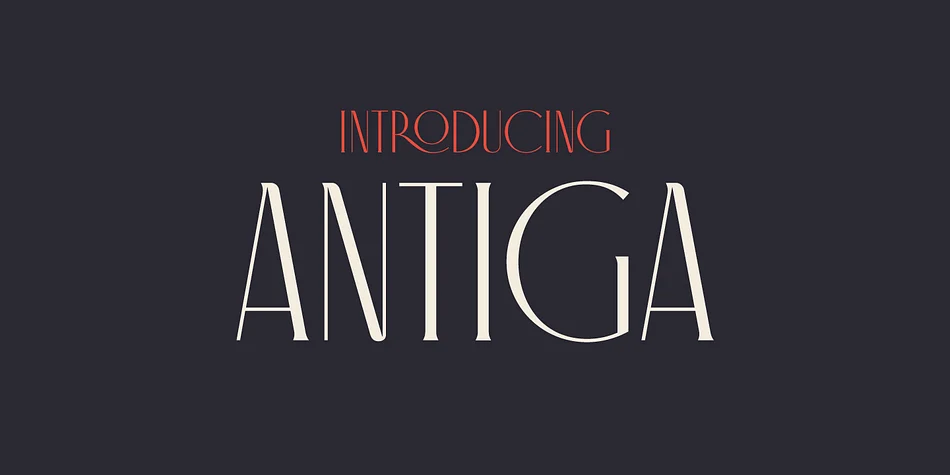
ANTIGA by FAEL merges classical Roman proportions with the graceful curves of Art Nouveau, creating a typeface that honors design history while feeling thoroughly contemporary and relevant. The design excels for editorial projects like literary magazine covers and sophisticated book jacket design, where structural refinement carries the visual weight without unnecessary decoration getting in the way of legibility. It shines equally on luxury product packaging, wine labels, and boutique restaurant menus that demand sophisticated visual language without resorting to heavy or distracting ornamentation. This balance between classical form and decorative detail means the typeface works across both timeless and trend-driven projects.
The font includes a generous set of ligatures and diacritics that add personality and nuance when working with longer passages of text and display settings. Put ANTIGA to work on art gallery catalogs, upscale event invitations, coffee table books, or cohesive identity systems where refined elegance matters most. Its balanced proportions remain legible at smaller sizes while retaining the decorative character that creates lasting impressions on readers. The interplay of classical authority with tasteful ornament gives you flexibility across projects of different scales and contexts, from intimate editorial spreads to larger environmental applications in boutiques and cultural spaces.
Get ANTIGA on Creative Fabrica and add this refined typeface to your collection.
Style & Use Cases
- Overall Style
- Bold, Distinctive
- Use Case
- Headlines, Posters
- Ideal For
- logos, packaging, and standout titles
- Pairs With
- a neutral sans-serif
How to Install ANTIGA Font
Step-by-step instructions for every platform
- 1Download the ANTIGA font file (.ttf or .otf).
- 2Locate the downloaded file in your Downloads folder.
- 3Right-click the font file.
- 4Select "Install" to install for the current user, or "Install for all users" to make it available system-wide.
- 5ANTIGA is now available in Word, Photoshop, Illustrator, and all other apps.
More by FAEL
View all →
Browse fonts by theme
Curated collections →Saw a font in a picture? Identify any font from an image with our free Font Finder.
More Decorative Fonts
Browse all →







What pairs well with ANTIGA Font?
ANTIGA Font is a decorative font that shines as a display or heading face. Pair it with a clean sans-serif or serif font for body text — the contrast creates a clear hierarchy while the two styles stay balanced and easy to read.




ANTIGA Font
by FAEL
Reviewed by the FontBoxDL team · Updated June 2026