 Firefox
 1 / 2
1 / 2About ANNOUNCEMENT BOARD JNL Font
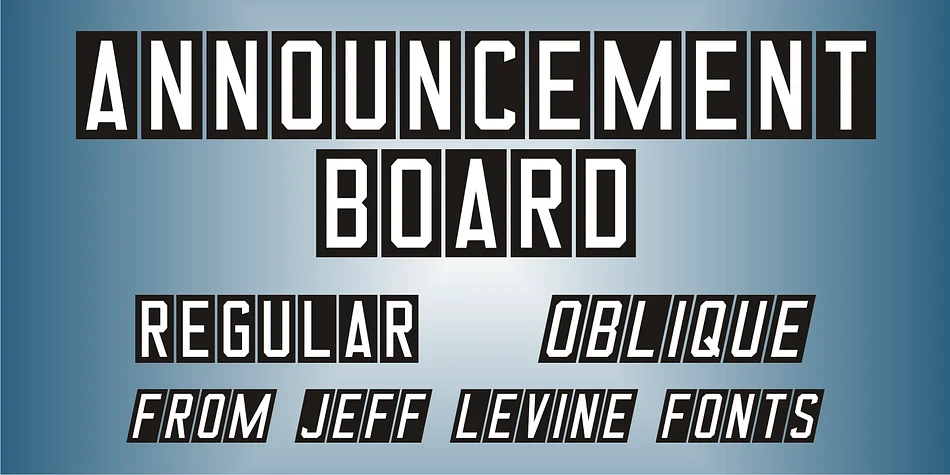
The block chamfer letterforms carry the unmistakable visual DNA of vintage outdoor signage systems, a style captured in ANNOUNCEMENT BOARD JNL, designed by Jeff Levine Fonts. White letters were silk-screened onto metal pieces, each with a crimp at the top that hooked onto rail panels, allowing institutions like churches and schools to swap messages in minutes. The typeface renders each character as though it's an individual metal piece, capturing both the geometry and the honest assembly quality of the originals.
The font comes in regular and oblique versions, plus two different width blank panel options (on both broken and solid bars) if you want to kern letters tightly into continuous ribbons. Its spacing preserves the intentional gaps that mimic hand assembly, so those vintage sign panels feel authentic rather than perfectly controlled. This makes it ideal for vintage storefront signage, retro theater marquees, DIY craft fair posters, and event announcement boards where that vintage character carries real weight.
This typeface works beautifully for projects rooted in mid-century Americana, from restaurant specials boards and boutique hotel wayfinding to outdoor signs designed to feel handmade rather than sterile. Grab ANNOUNCEMENT BOARD JNL on Creative Fabrica.
Style & Use Cases
- Overall Style
- Eye-catching, Bold
- Use Case
- Headlines, Logos
- Ideal For
- posters, branding, and social media graphics
- Pairs With
- a readable sans or serif for body
How to Install ANNOUNCEMENT BOARD JNL Font
Step-by-step instructions for every platform
- 1Download the ANNOUNCEMENT BOARD JNL font file (.ttf or .otf).
- 2Locate the downloaded file in your Downloads folder.
- 3Right-click the font file.
- 4Select "Install" to install for the current user, or "Install for all users" to make it available system-wide.
- 5ANNOUNCEMENT BOARD JNL is now available in Word, Photoshop, Illustrator, and all other apps.
More by Jeff Levine Fonts
View all →



Browse fonts by theme
Curated collections →Saw a font in a picture? Identify any font from an image with our free Font Finder.
More Display Fonts
Browse all →







What pairs well with ANNOUNCEMENT BOARD JNL Font?
ANNOUNCEMENT BOARD JNL Font is a display font that shines as a display or heading face. Pair it with a clean sans-serif or serif font for body text — the contrast creates a clear hierarchy while the two styles stay balanced and easy to read.




ANNOUNCEMENT BOARD JNL Font
Reviewed by the FontBoxDL team · Updated September 2026