 Firefox
 1 / 3
1 / 3Loading font…
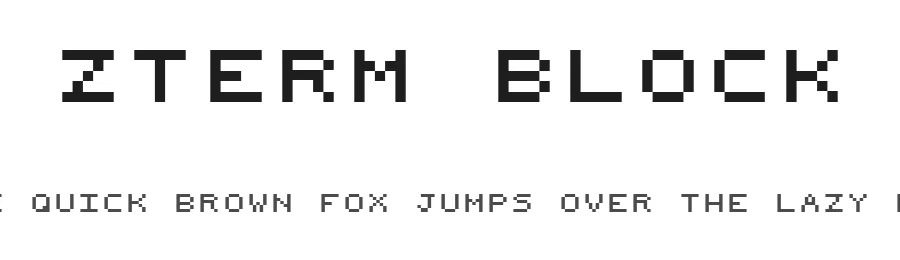
About zTerm Block Font
zTerm Block is a pixel-style display typeface in regular weight, rooted in the retro aesthetic of early digital and computing design. With 231 glyphs and support for over 209 Latin-based languages, this blocky, grid-aligned design delivers authentic 8-bit character and nostalgic appeal to projects that demand a distinctly digital or vintage tech voice.
Its geometric precision and modular structure make pixel fonts like zTerm Block exceptionally suitable for several key applications: game interface design, including menu text and UI labels, retro-inspired poster headlines and print headers, Etsy digital product covers and social media graphics, and Cricut vinyl decal cutting for custom apparel and merchandise. Grid-based construction ensures strong legibility even when rendered at small sizes, a crucial advantage for interface designers balancing aesthetic impact with functional readability. Blocky letterforms register cleanly on screen and in print, avoiding the rendering issues that plague less carefully constructed pixel typefaces.
For maximum impact, pair zTerm Block with minimal, clean sans-serif body text to let its retro personality shine without visual conflict. This pairing works particularly well in gaming contexts, vintage branding systems, and technology-focused publications. Free for personal use only, with a commercial licence available from the designer.
Style & Use Cases
- Overall Style
- Eye-catching, Bold, Pixel
- Use Case
- Headlines, Logos
- Ideal For
- posters, branding, and social media graphics
- Pairs With
- a readable sans or serif for body
zTerm Block Specifications
| Font Family | zTerm |
| Style | Regular |
| Full Name | zTerm |
| Version | Macromedia Fontographer 4.1.3 05/17/2001 |
| Weight | 400 (Regular) |
| Glyph Count | 231 glyphs |
| PostScript Name | ZTerm |
| Format | TTF (TrueType) |
| File Size | 51.6 KB |
Languages Supported
zTerm Block supports 209 languages.
How to Install zTerm Block Font
Step-by-step instructions for every platform
- 1Download the zTerm Block font file (.ttf or .otf).
- 2Locate the downloaded file in your Downloads folder.
- 3Right-click the font file.
- 4Select "Install" to install for the current user, or "Install for all users" to make it available system-wide.
- 5zTerm Block is now available in Word, Photoshop, Illustrator, and all other apps.
Browse fonts by theme
Curated collections →Saw a font in a picture? Identify any font from an image with our free Font Finder.
More Display Fonts
Browse all →







What pairs well with zTerm Block Font?
zTerm Block Font is a display font that shines as a display or heading face. Pair it with a clean sans-serif or serif font for body text — the contrast creates a clear hierarchy while the two styles stay balanced and easy to read.




Premium Display Fonts
★ PremiumWant something with more weights, glyphs, and commercial polish? These premium display fonts are worth a look.

zTerm Block Font
Reviewed by the FontBoxDL team · Updated October 2026
License: Free for personal use