
 1 / 7
1 / 7About Winstyle Signature Font
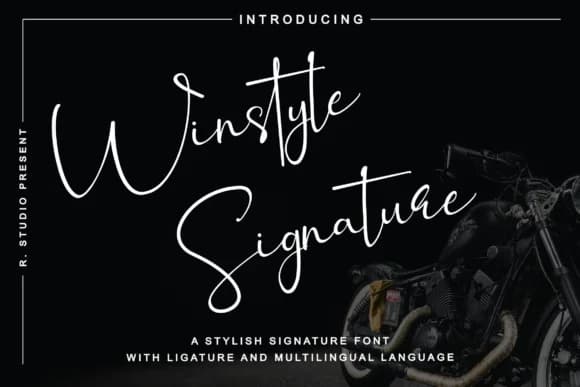
There's something immediately graceful about a signature that feels both personal and refined. Winstyle Signature Font, designed by R. Studio, captures this duality with flowing letterforms that evoke genuine handwritten script while maintaining the careful polish of deliberate design.
This typeface works beautifully in contexts where personality and credibility need to coexist. Wedding invitation suites gain both sophistication and warmth when set in Winstyle's elegant curves, as do luxury cosmetics packaging and boutique restaurant branding materials. Photography watermarks become visual signatures themselves when rendered in this refined script, adding authenticity to images rather than distraction. Even greeting card designs and artisan product labels benefit from the approachable-yet-elegant quality that makes this font feel like it came from someone's personal pen rather than a generic typeface library.
The brush-like construction of each letter balances consistency with organic movement, which matters when you're trying to establish trust without sacrificing character or warmth. No artificial flourishes distract from the core beauty of the letterforms themselves. Pair Winstyle Signature with a minimal, clean sans-serif when you need body text or supporting elements, letting the script do what it does best: capture attention and convey personality with ease. Get Winstyle Signature from Creative Fabrica and bring that handmade authenticity to designs that deserve it.
Style & Use Cases
- Overall Style
- Elegant, Flowing, Branding
- Use Case
- Invitations, Branding
- Ideal For
- wedding stationery, greeting cards, and signatures
- Pairs With
- a simple uppercase sans
How to Install Winstyle Signature Font Font
Step-by-step instructions for every platform
- 1Download the Winstyle Signature Font font file (.ttf or .otf).
- 2Locate the downloaded file in your Downloads folder.
- 3Right-click the font file.
- 4Select "Install" to install for the current user, or "Install for all users" to make it available system-wide.
- 5Winstyle Signature Font is now available in Word, Photoshop, Illustrator, and all other apps.

More Script Handwritten Fonts
Browse all →







What pairs well with Winstyle Signature Font?
Winstyle Signature Font is a script font that shines as a display or heading face. Pair it with a clean sans-serif or serif font for body text — the contrast creates a clear hierarchy while the two styles stay balanced and easy to read.



Winstyle Signature Font
by R. Studio
Reviewed by the FontBoxDL team · Updated June 2026