
 1 / 9
1 / 9About Anthusia Font
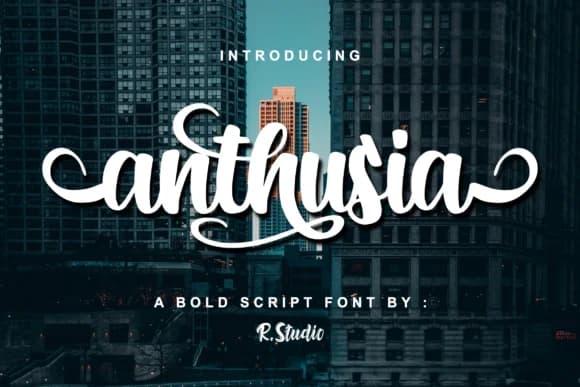
Anthusia by R. Studio is a bold script with pronounced, natural brushstrokes that feel genuinely hand-lettered rather than digitally sterile. The strong character weight and expressive flowing forms make it especially suited for wedding invitation suites where guests expect real craftsmanship, luxury cosmetics and skincare packaging that signals artisanal quality, and high-end fashion branding where authenticity matters more than polish. Restaurant menus, wine labels, greeting cards, and personalized stationery also gain considerable personality from its unpolished confidence. What makes Anthusia work across such varied contexts is that it delivers what contemporary designers and audiences actually want: letterforms that clearly show human intention and deliberation behind every stroke and curve.
The font's boldness keeps characters legible and distinct even at smaller sizes, which opens possibilities for intricate luxury packaging design, custom event signage, and detailed logo lockups where precision and readability both matter. Book covers in the lifestyle and wellness publishing space also work beautifully with its contemporary calligraphic flavor. From boutique brand identities to editorial illustration and photography retouching work, Anthusia brings genuine visual presence and movement to projects that would otherwise feel corporate or generic. If you're after a script that feels earned rather than applied to your designs, grab Anthusia from Creative Fabrica.
Style & Use Cases
- Overall Style
- Elegant, Flowing, Branding
- Use Case
- Invitations, Branding
- Ideal For
- wedding stationery, greeting cards, and signatures
- Pairs With
- a simple uppercase sans
How to Install Anthusia Font Font
Step-by-step instructions for every platform
- 1Download the Anthusia Font font file (.ttf or .otf).
- 2Locate the downloaded file in your Downloads folder.
- 3Right-click the font file.
- 4Select "Install" to install for the current user, or "Install for all users" to make it available system-wide.
- 5Anthusia Font is now available in Word, Photoshop, Illustrator, and all other apps.
More by R. Studio
View all →

More Script Handwritten Fonts
Browse all →







What pairs well with Anthusia Font?
Anthusia Font is a script font that shines as a display or heading face. Pair it with a clean sans-serif or serif font for body text — the contrast creates a clear hierarchy while the two styles stay balanced and easy to read.



Anthusia Font
by R. Studio
Reviewed by the FontBoxDL team · Updated June 2026