 Firefox
 1 / 6
1 / 6About Wings Flutter Freely Font
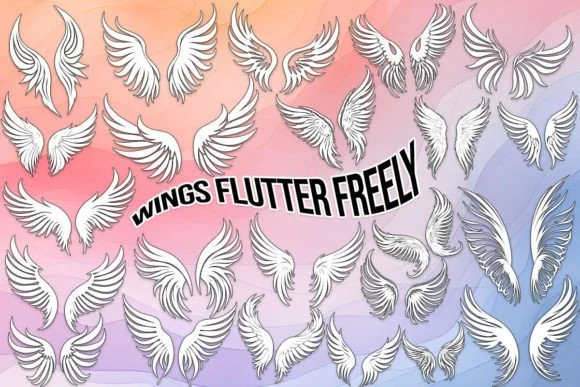
These letterforms flow with organic movement, suggesting wings and flight through negative space and gesture rather than heavy ornamentation. Wings Flutter Freely, designed by MOMAT THIRTYONE, is a dingbats collection that captures feathers suspended in motion. The typeface includes 26 uppercase variations, 26 lowercase alternatives, and the complete numeric set 0-9, each character pairing consistently throughout the entire collection.
The font shines in ornamental contexts where you need genuine visual personality without pretense. Wedding invitation borders and reply cards work beautifully, as do greeting card decoration elements that would otherwise feel generic. You can use it for boutique business card accents, hand-lettered scrapbooking layouts where a symbolic flourish feels earned, chapter dividers in printed journals that need visual breathing room, or event programs themed around angels and natural systems. Brand identity systems that lean toward flight or spiritual concepts, plus icon variations in logotype families and symbol sets, all benefit from its visual vocabulary.
This one lands best for designers working on projects that demand ornamental character without feeling overwrought or forced. If you're building something where feather and flight references belong woven into the typography itself, Wings Flutter Freely is available on Creative Fabrica.
Style & Use Cases
- Overall Style
- Iconographic, Wing
- Use Case
- Icons, Accents
- Ideal For
- ornaments, bullets, and decorative flourishes
- Pairs With
- any text font
How to Install Wings Flutter Freely Font
Step-by-step instructions for every platform
- 1Download the Wings Flutter Freely font file (.ttf or .otf).
- 2Locate the downloaded file in your Downloads folder.
- 3Right-click the font file.
- 4Select "Install" to install for the current user, or "Install for all users" to make it available system-wide.
- 5Wings Flutter Freely is now available in Word, Photoshop, Illustrator, and all other apps.
More by MOMAT THIRTYONE
View all →



Browse fonts by theme
Curated collections →Saw a font in a picture? Identify any font from an image with our free Font Finder.
More Dingbats Fonts
Browse all →







What pairs well with Wings Flutter Freely Font?
Wings Flutter Freely Font is a versatile dingbats font that works for both headings and body text. Pair it with a contrasting sans-serif or serif font to add visual interest and a clear distinction between titles and body copy.




Wings Flutter Freely Font
Reviewed by the FontBoxDL team · Updated June 2026