 Firefox
 1 / 6
1 / 6About Wedding Rose Bouquet Font
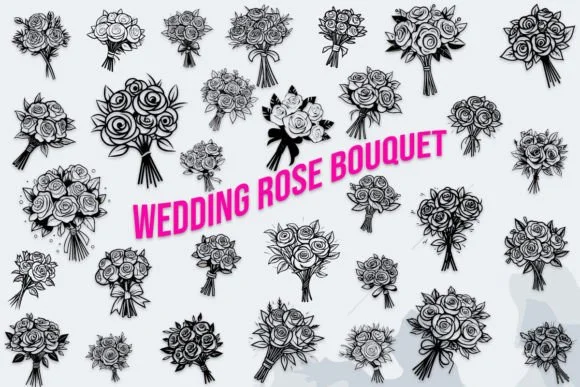
Wedding Rose Bouquet, designed by MOMAT THIRTYONE, fills each character with delicate floral details and romantic flourishes that transform standard type into botanical art. This dingbat collection offers 26 uppercase, 26 lowercase, and 10 numeric forms, each rendered as ornamental botanical elements rather than standard letterforms. The blooms and intertwining vines turn type into decoration, giving every character its own intricate personality worth lingering over.
The font shines in projects where florals do the visual storytelling. Wedding invitation suites, custom menus for garden events, pressed flower preserve labels, and bridal shower programs all sing with this typeface. Boutique florist branding, stationery sets for small weddings, and DIY decorative signage benefit equally from its organic sophistication. High-end designers drafting luxury event materials appreciate how these ornamental forms add refinement without veering into kitsch or overwhelming the design.
What gives this collection staying power is consistency: the floral language remains cohesive across uppercase and lowercase forms, so mixed-case typography reads as intentional design rather than visual confusion. Stationery designers, hand-lettering enthusiasts, and small business owners building nature-inspired brands find real utility here. This font belongs with anyone orchestrating intimate, botanically rich designs where every detail serves the overall vision. Find Wedding Rose Bouquet on Creative Fabrica to add this botanical charm to your work.
Style & Use Cases
- Overall Style
- Iconographic, Wedding
- Use Case
- Icons, Accents
- Ideal For
- ornaments, bullets, and decorative flourishes
- Pairs With
- any text font
How to Install Wedding Rose Bouquet Font
Step-by-step instructions for every platform
- 1Download the Wedding Rose Bouquet font file (.ttf or .otf).
- 2Locate the downloaded file in your Downloads folder.
- 3Right-click the font file.
- 4Select "Install" to install for the current user, or "Install for all users" to make it available system-wide.
- 5Wedding Rose Bouquet is now available in Word, Photoshop, Illustrator, and all other apps.
More by MOMAT THIRTYONE
View all →



Browse fonts by theme
Curated collections →Saw a font in a picture? Identify any font from an image with our free Font Finder.
More Dingbats Fonts
Browse all →







What pairs well with Wedding Rose Bouquet Font?
Wedding Rose Bouquet Font is a versatile dingbats font that works for both headings and body text. Pair it with a contrasting sans-serif or serif font to add visual interest and a clear distinction between titles and body copy.




Wedding Rose Bouquet Font
Reviewed by the FontBoxDL team · Updated July 2026