 Firefox
 1 / 5
1 / 5About Village Doodle Font
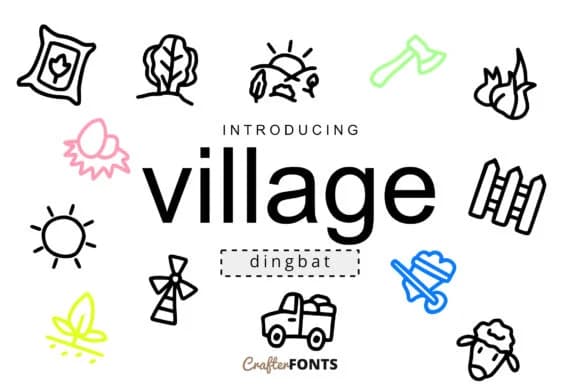
There's something charming about a font built on simple shapes and rural warmth. Village Doodle by CrafterFonts brings this distinctive hand-drawn personality to symbol-based design, offering a collection of doodle marks perfect for projects that need genuine character over generic clip art. This dingbat font really stands out in farmer's market signage, cottage-inspired stationery sets, agricultural product labels, and rustic wedding invitation suites. The collection includes multiple character variations that let you layer details and create custom compositions without hunting for separate fonts.
Consider pairing Village Doodle with a neutral sans-serif like Open Sans or Montserrat for body copy. You'll end up with a visual system that feels both organic and readable, which matters when your design needs to communicate clearly. The doodle marks work beautifully in hand-lettered wooden signs, digital graphics for homestead brands, and custom templates for DIY craft projects. It's the kind of font that transforms everyday work into something with real depth and thoughtfulness, rather than looking like it came straight from a template library.
Pick it up from Creative Fabrica. These little marks have a wonderful way of making every application feel more intentional and handmade, which is worth the download all on its own.
Style & Use Cases
- Overall Style
- Iconographic, Doodle
- Use Case
- Icons, Accents
- Ideal For
- ornaments, bullets, and decorative flourishes
- Pairs With
- any text font
How to Install Village Doodle Font
Step-by-step instructions for every platform
- 1Download the Village Doodle font file (.ttf or .otf).
- 2Locate the downloaded file in your Downloads folder.
- 3Right-click the font file.
- 4Select "Install" to install for the current user, or "Install for all users" to make it available system-wide.
- 5Village Doodle is now available in Word, Photoshop, Illustrator, and all other apps.
More by CrafterFonts
View all →
Browse fonts by theme
Curated collections →Saw a font in a picture? Identify any font from an image with our free Font Finder.
More Dingbats Fonts
Browse all →







What pairs well with Village Doodle Font?
Village Doodle Font is a versatile dingbats font that works for both headings and body text. Pair it with a contrasting sans-serif or serif font to add visual interest and a clear distinction between titles and body copy.



Village Doodle Font
by CrafterFonts
Reviewed by the FontBoxDL team · Updated July 2026