 Firefox
 1 / 3
1 / 3Loading font…
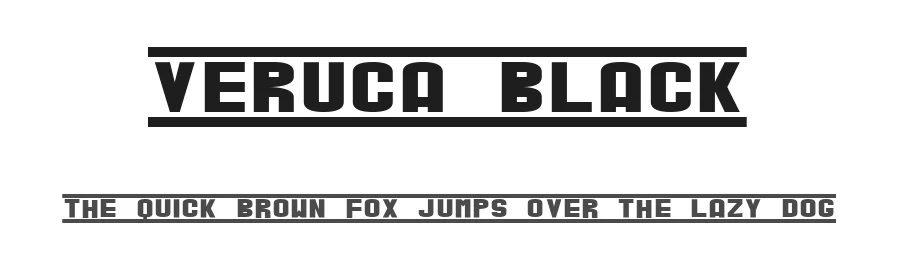
About Veruca Black Font
Veruca Black is a display typeface in the decorative category, marked by substantial weight and unapologetic visual presence designed for graphic-forward work. The font contains 228 glyphs with support across 214+ Latin-based languages, providing solid character coverage for both monolingual and multilingual design projects.
This typeface's primary strength lies in treating letterforms as design elements rather than neutral text carriers. Veruca Black performs particularly well for event poster headlines, social media graphics that need visual weight to command attention in a crowded feed, T-shirt and vinyl decal designs where bold letterforms carry the core message, and product packaging labels where typography itself signals brand personality and authority. Its broad language support ensures consistent performance across European and extended Latin character sets, making it reliable for international projects and multilingual campaigns where you need a single heavyweight typeface that maintains visual cohesion across different alphabets.
Veruca Black is available free for personal use only; commercial applications require a licence purchased from the designer. Select this typeface when your layout specifically demands visual drama and decorative strength, saving it for projects where that character genuinely fits the goal.
Style & Use Cases
- Overall Style
- Heavy, Eye-catching, Bold, Decorative
- Use Case
- Headlines, Logos
- Ideal For
- posters, branding, and social media graphics
- Pairs With
- a readable sans or serif for body
Veruca Black Specifications
| Font Family | Veruca |
| Style | Black |
| Full Name | Veruca Black |
| Version | FALL 1999 REVISION |
| Weight | 900 (Black) |
| Glyph Count | 228 glyphs |
| PostScript Name | VerucaBlack |
| Format | TTF (TrueType) |
| File Size | 40.8 KB |
Languages Supported
Veruca Black supports 214 languages.
How to Install Veruca Black Font
Step-by-step instructions for every platform
- 1Download the Veruca Black font file (.ttf or .otf).
- 2Locate the downloaded file in your Downloads folder.
- 3Right-click the font file.
- 4Select "Install" to install for the current user, or "Install for all users" to make it available system-wide.
- 5Veruca Black is now available in Word, Photoshop, Illustrator, and all other apps.
Browse fonts by theme
Curated collections →Saw a font in a picture? Identify any font from an image with our free Font Finder.
More Display Fonts
Browse all →







What pairs well with Veruca Black Font?
Veruca Black Font is a display font that shines as a display or heading face. Pair it with a clean sans-serif or serif font for body text — the contrast creates a clear hierarchy while the two styles stay balanced and easy to read.




Premium Display Fonts
★ PremiumWant something with more weights, glyphs, and commercial polish? These premium display fonts are worth a look.


Veruca Black Font
Reviewed by the FontBoxDL team · Updated October 2026
License: Free for personal use